- Joined
- Sep 9, 2022
- Messages
- 81
- Reaction score
- 18
Hi
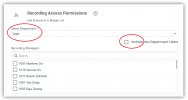
I'd like to be able to set a user's role so that they can see all recordings for users within the same department but NOT be able to see recordings for people in other departments. It seems that, in order to see recordings at all, the user would have to have at least the Manager role but I'm concerned that would give them access to recording for other departments.
I'm also a little confused by the "Show call recording" option in Options for each user. Do I need to have this selected or not?
The help text says, if the checkbox “Show call recording” is checked, the user’s recordings are accessible to other departments’ managers, group owners and system owners. Does that imply that if it is NOT checked, it will only be visible to a Manager in the same Department?
I'd like to be able to set a user's role so that they can see all recordings for users within the same department but NOT be able to see recordings for people in other departments. It seems that, in order to see recordings at all, the user would have to have at least the Manager role but I'm concerned that would give them access to recording for other departments.
I'm also a little confused by the "Show call recording" option in Options for each user. Do I need to have this selected or not?
The help text says, if the checkbox “Show call recording” is checked, the user’s recordings are accessible to other departments’ managers, group owners and system owners. Does that imply that if it is NOT checked, it will only be visible to a Manager in the same Department?