Solved Linux VM freezing since upgrade to v18

Status
Not open for further replies.

mackey

Free User
Basic Certified
Joined
Jan 31, 2022
Messages
18
Reaction score
7
Hello All,

I have a 3cx instance running on ESXi installed using the standard ISO image from 3CX.
Since upgrading to version 18 the whole VM is freezing/locking every 2-3days. I have increased the RAM and vCPU but the problem continues.
I have even rebuilt the VM from scratch and restored the a backup config.

Anyone else having this issue?
 
Hi @mackey,

Are you using any backup solution like Veeam?

When the machine locks, do you still have SSH access?

Are you able restart the instance via the ESXi console and if yes, does it work after this?
 
Last edited by a moderator:
Hi,

No there is no backup like veam running. The VM completely freezes, no ssh and even the console screen freezes and I have to perform for forced reboot in esxi to get it back.

Thanks.
 
Hi @mackey,

We use ESXi ourselves and we've not run into anything like this. It could well be that something on the host is going awry. I suggest investigating the host.
 
It was rock solid for months before the upgrade to v18 and nothing has changed with the host hardware/software.
The only addition to the ISO provided by 3CX is installing the open source VMWare tools on Debian. Maybe that's the issue?
 
Hi @mackey,

We've been running ESXi internally that have VMWare tools and we've not had any problems thus far. We were using VMs on 6.7 and currently use 7.0 without any problems.
 
Came in the office today and its gone again. I'm going to have to rollback to v17. We can't have this happening every few days.
 
Hi @mackey,

I understand your frustration and if certain 3CX services drop on the host but the host continues to work, I can see that as a 3CX specific issue but because the host itself is freezing, this points to a larger issue. I'd try and install 3CX on another host if you have one available, or perhaps using a different hypervisor to see if this happens again. I'm afraid beyond that, there is not much I can do about it.
 
Hi, The same host ran v17 without issue. On the same host we have other Debian systems that are rock solid. It can not be the host at fault here.
Are they're no logs we can pull to see whats going on?
 
Hi @mackey,

There are logs to check, of course. Have a look at the syslogs in the Management Console >> Dashboard >> Activity Log >> Logs >> Linux Syslog.
 
Here are the last log entries. Ironically it looks like it's the Log rotation job that seems to have crashed the VM.

Feb 3 22:30:12 3cx systemd[1]: Started Daily apt download activities.
Feb 3 22:35:01 3cx CRON[25216]: (root) CMD (command -v debian-sa1 > /dev/null && debian-sa1 1 1)
Feb 3 22:45:01 3cx CRON[25465]: (root) CMD (command -v debian-sa1 > /dev/null && debian-sa1 1 1)
Feb 3 22:55:01 3cx CRON[25739]: (root) CMD (command -v debian-sa1 > /dev/null && debian-sa1 1 1)
Feb 3 23:05:01 3cx CRON[25983]: (root) CMD (command -v debian-sa1 > /dev/null && debian-sa1 1 1)
Feb 3 23:15:01 3cx CRON[26230]: (root) CMD (command -v debian-sa1 > /dev/null && debian-sa1 1 1)
Feb 3 23:17:01 3cx CRON[26291]: (root) CMD ( cd / && run-parts --report /etc/cron.hourly)
Feb 3 23:25:01 3cx CRON[26523]: (root) CMD (command -v debian-sa1 > /dev/null && debian-sa1 1 1)
Feb 3 23:35:01 3cx CRON[26806]: (root) CMD (command -v debian-sa1 > /dev/null && debian-sa1 1 1)
Feb 3 23:45:01 3cx CRON[27084]: (root) CMD (command -v debian-sa1 > /dev/null && debian-sa1 1 1)
Feb 3 23:55:01 3cx CRON[27367]: (root) CMD (command -v debian-sa1 > /dev/null && debian-sa1 1 1)
Feb 3 23:59:01 3cx CRON[27471]: (root) CMD (command -v debian-sa1 > /dev/null && debian-sa1 60 2)
Feb 4 00:00:51 3cx systemd[1]: Starting Rotate log files...
 
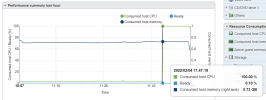
So its just happened again @ 11:47 the VM went 100% CPU

Log attached,
Screenshot 2022-02-04 115851.png
 

Attachments

Last edited by a moderator:
Hi!

From what I can see, the last logs in the syslog prior to the reboot that happened at 11:59:24 as far as I can tell, don't show any abnormal actions happening on the OS.

I'll have to agree with my colleague @VasilisV_3CX on this one, this looks to be a fundamental issue between this specific Debian OS installation and your host.

As a test, I would maybe recommend taking a 3CX Backup, downloading off the 3CX VM, deleting the VM, creating a brand new one from the new V18 Deb10 3CX ISO that will directly install Deb10 with V18 and restore your backup.
 
  • Like
Reactions: KVCIT
Hi!

From what I can see, the last logs in the syslog prior to the reboot that happened at 11:59:24 as far as I can tell, don't show any abnormal actions happening on the OS.

I'll have to agree with my colleague @VasilisV_3CX on this one, this looks to be a fundamental issue between this specific Debian OS installation and your host.

As a test, I would maybe recommend taking a 3CX Backup, downloading off the 3CX VM, deleting the VM, creating a brand new one from the new V18 Deb10 3CX ISO that will directly install Deb10 with V18 and restore your backup.
Hi Nick,

Thanks for your input, I have already tried your suggestion with no success.

I have just uninstalled open VMTools to see if that helps.
 
  • Like
Reactions: NickD_3CX
The VM hasn't froze since I performed a "apt-get update" followed by "apt-get dist-upgrade".

I'll keep you posted if that changes.
 
I can confirm - but I know what causes my issue...

Not host.. its the VM...

Network / Inet connection is dropped - VM keeps attempting to get access to Flowroute I think / registering
flowroute is my test SIP service -
This site specifically has a newer Sonicwall...
And if you've seen the recent news... Sonicwall just released fixes for their latest kernel panic issue...
which - drops the inet connection actually the entire Firewall is a brick until you reset the power...

I have other servers setup exactly the same and don't have the same issue - but they haven't had recent firewall failures... (meraki / fortinet / opnsense - those haven't had any issues Virtual / Physical)

So they've been solid..
even have one small office on a RPi version and they Do have Firewall / ISP issues as of late but also that system has been solid - even has flowroute backup and is good...

thinking Firewall + vmware VM + Flowroute
system keeps trying to register without inet and freezes up - is my theory....

Which log would you specifically like to see.. I just rebooted - I didn't catch it for the last several hours so my after hours calls were a mess!
 
Last edited:
I can confirm - but I know what causes my issue...

Not host.. its the VM...

Network / Inet connection is dropped - VM keeps attempting to get access to Flowroute I think / registering
flowroute is my test SIP service -
This site specifically has a newer Sonicwall...
And if you've seen the recent news... Sonicwall just released fixes for their latest kernel panic issue...
which - drops the inet connection actually the entire Firewall is a brick until you reset the power...

I have other servers setup exactly the same and don't have the same issue - but they haven't had recent firewall failures... (meraki / fortinet / opnsense - those haven't had any issues Virtual / Physical)

So they've been solid..
even have one small office on a RPi version and they Do have Firewall / ISP issues as of late but also that system has been solid - even has flowroute backup and is good...

thinking Firewall + vmware VM + Flowroute
system keeps trying to register without inet and freezes up - is my theory....

Which log would you specifically like to see.. I just rebooted - I didn't catch it for the last several hours so my after hours calls were a mess!
You seem to have detected a pattern in your case, however I'm having a bit of a hard time accepting it.
Assuming that the Firewall for whatever reason is blocking outbound traffic to Flowroute, that would justify the SIP Trunk not working. Although unlikely, let's say it even affects all 3CX Services.

That still doesn't explain why the VM OS is also becoming unresponsive.

If I had to guess, this "chain" is the other way around: something is affecting the VM OS, which in turn is making 3CX stop working.

[EDIT]
Just realized I didn't answer your question. To check the SIP logs, enable Verbose, then let is run. Then every hour or so, generate the Support Info package from the "Support" drop-down in the top-right corner, extract the "Log" folder and open the log files with 3CX Log Viewer.
This will be a bit tricky, if the machine freezes and you force reboot it, on boot the services will start again and will overwrite the existing files, but you should be ale to determine though your suspicion even before the "Freeze" occurs.
 
Last edited:
Just odd - I did notice that same issue as the Op..

I would usually suspect same as you VM / Host...
however all other VMs Windows / Debian non issue except 3CX Fully freezes..

wonder if OP - has a sonicwall...hummm

---
this weekend I'll do a loss of network - remove vlan gateway basically for the voice vlan and see if that causes it to freeze up after x amount of time

pretty sure I can force replicate it now just not sure how long it takes
 
  • Like
Reactions: NickD_3CX
Re-Read your assement 3CX -
that makes sense... and is logical..

VM OS issue vs 3CX - More Debian issue agreed vs 3CX
(still much prefer the linux stability with 3CX by a mile!)
OS having some issue when gateway is no longer functional -
See some minor things but nothing concrete with Debian Gateway loss causing OS Lockup / Freeze forcing Reboot / Reset of power. - Didn't watch the performance like Op did
that was a nice catch of VM just going 100% CPU like that.
(i've been in hurry up and fix mode when it happens and just reboot)

tried Dist-Upgrade on mine - but was current...
there were a couple upgrades so I ran those.
libexpat1 libwbclient0
----
Will update later this week if I can test my theory and see what logs generate from that.
 
  • Like
Reactions: NickD_3CX
Just to add, my 3CX crashed again today. :(
 
  • Like
Reactions: KVCIT
Status
Not open for further replies.

Forum statistics

Threads
111,974
Messages
590,083
Members
164,901
Latest member
Silent_Guru