Solved "Listen" Feature not Working On Transferred Calls

Status
Not open for further replies.

philodendrin

Silver Partner
Basic Certified
Joined
Jun 16, 2010
Messages
16
Reaction score
2
On the latest build of 3CX V.16 Pro (16.0.6) we have a customer with the following scenario:

Extension A dials a customer (makes an external call), then transfers that call to Extension B. After the call is transferred we see in the switchboard, the call listed as Caller: Extension A / Callee Extension B. The external number is not shown. Under "Details" instead of External or Internal call, nothing is listed. This is a call center and the manager needs to monitor calls. They have been using the Web client and right clicking on the call in the switchboard to choose the "Listen" and "Barge In" options as necessary. While those features/options appear and work on a call that has not been transferred (a direct call), once the call is transferred there are no such options. In fact, there are no options. When you right click on the call, no options come up. The user attempting to monitor the call is a manager with full rights and all extensions are in the same group.

On the trunk side, I note that the customer has separate trunks for inbound and outbound calls ...and I'm not sure if that has something to do with this behavior. Otherwise, we have been unable to figure out what's causing it.

Anyone have any ideas?

1598992728503.png
 

Attachments

  • 1598992656831.png
    1598992656831.png
    81.7 KB · Views: 5
Hello,

Even if an external call is transferred to another extension, you should normally be able to still see it as being an external call and also have the rights to Listen/Barge/Whisper.

Please describe your entire call flow path for such calls, so we can see if there is anything unusual that may cause it. We need this to be as detailed as possible.

1. Where does the call arrive? (gateway? internet trunk? which provider is this)
2. Do you have an inbound rule for this call? where does it route the call?
3. Does it end up in an IVR first?
4. Does it reach a ring group or queue?
5. Do the members of the above pick up or does it timeout and go to a different destination?

All the details are important, be as meticulous as you can in your description.
Provide a way with the least amount of steps someone can use to replicate this if possible
 
So, an example call flow would be:

  1. Extension 6023 presses his first line and initiates an outbound call to an external number and reaches the external customer on his Yealink T21P_E2
  2. Extension 6023 presses trans soft key (not the trans key on the bottom right) and enters 8000 to ring sales queue. During this time customer hears hold music.
  3. Extension 6023 speaks with extension 6018 (also on Yealink T21P_E2), assigned via round-robin from sales queue and they exchange customer info. During this time customer hears hold music.
  4. Extension 6023 presses trans soft key again to connect the customer to sales agent on extension 6018 and completes the transfer. Customer is connected to extension 6018.
  5. Sales Manager on Ext 0001 attempts to listen to call in 3CX Web client and no options are available. Call shows as between 6023 and 6018 instead of as between external number and 6018 in switchboard.
I noted today that group users did not have transfer rights (only managers) and changed that, but there was no change in behavior and I'm confused as to how transfers were happening at all without that permission set.

But, as I delve deeper into this, I'm guessing that it's the queue that's throwing something off. 3cx handles the transfer of the external caller from ext. 6023 to 6018 just fine, but then loses the external caller info. somehow due to the use of a queue instead of calling 6018 directly? Also, the customer claims that if they attempt the same call flow using 3CX client (no Yealink in the mix) they get all the options - listen, barge, etc. So, we can possibly assume that it's the Yealink transfer having an impact.

The trunk provider is Vitelity.

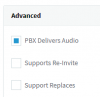
Another oddity is that we normally see three options under "Troubleshooting" within the extension options - PBX Delivers Audio, Supports Re-Invites, and Support Replaces Header. We're only seeing the first two and neither are checked. I realize this may be provider specific and Vitelity is not a provider we see a lot. Typically "Supports Re-Invites" is checked by default for most of our customers.
 
Last edited:
I think this part is key, lets make some changes

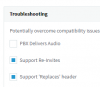
Keep your Vitelity trunk like so:
1599126148003.png

And your agent extensions like so
1599126187564.png

To conclude, the trunk must not use Re-invites, but the internal extensions should.

Let me know if this was sufficient to solve the issue or if we need to look further.
 
Selecting "Support Re-Invites" and "Support Replaces Header" in the extension options did indeed fix it.

Thanks for confirming not having that checked wasn't proper. I'm not sure why the customer would have unselected that option, as I can clearly see those options are selected by default when creating a new extension.

Interestingly, it still shows the transferred call as between the extension that transferred the call and the extension that accepts the transfer, instead of showing the customer's number once the call is transferred. In the switchboard the telephone icon now turns red and we have all of the options when right clicking on the call. And that's really what the customer needed. So, all is well.

Thanks, again!
 
  • Like
Reactions: JohnS_3CX
Glad to help!
 
Status
Not open for further replies.

Latest Posts

Forum statistics

Threads
111,962
Messages
589,993
Members
164,867
Latest member
swegner