- Joined
- May 6, 2019
- Messages
- 60
- Reaction score
- 18
I'm curious regarding if any customizations are available on the Live Chat feature.
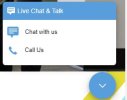
1. Is there any way to change the Live Chat wording on the popup? i.e. Simply changing the title to say "(Customer name) Chat" Instead of "Live Chat and Talk". 2. Is the schedule coming back to the Live Chat feature? Originally this was in the Wordpress plugin I believe.
3. With the schedule or if all agents are logged out, is there a way to delay the messages that come in after hours. Currently, even though the Live Chat window says all agents are offline, it still allows for a message to be left that gets sent tot he user/queue. It would be good to either disable chat afterhours or upon agent logout or to delay the message from going to an agent until they log back in.
I'm sure I have more but those are the biggest customizations that I would like to see available if they are not already.
Thanks!
1. Is there any way to change the Live Chat wording on the popup? i.e. Simply changing the title to say "(Customer name) Chat" Instead of "Live Chat and Talk". 2. Is the schedule coming back to the Live Chat feature? Originally this was in the Wordpress plugin I believe.
3. With the schedule or if all agents are logged out, is there a way to delay the messages that come in after hours. Currently, even though the Live Chat window says all agents are offline, it still allows for a message to be left that gets sent tot he user/queue. It would be good to either disable chat afterhours or upon agent logout or to delay the message from going to an agent until they log back in.
I'm sure I have more but those are the biggest customizations that I would like to see available if they are not already.
Thanks!