Live Chat icon is not working

Status
Not open for further replies.

Paulfromsurrey

Customer
Joined
Feb 8, 2022
Messages
7
Reaction score
0
I have installed the pluging on my wordpress site

Link if we post in url works fine but it does not work when we click on the chat icon
Please help

Let me know which information is needed to trouble shoot

3cx is setup v20 is installed

latest version the wordpress and app is installed
 
In the PBX did you configure the url as https://www ?
 
Can you try and add it in this format and let me know?
 
if i enter url in any browser it works fine but not on the wordpress site
 
Understood however can you add it in this format in the PBX configuration of the live chat?
 
Have you tried clearing your browser's cache? If possible, can you share your website with everyone? I also use WordPress, and it is working very well.
 
If a website is defined as https://3cx.com in the live chat, it will not show the chat bubble if the website entered is https://www.3cx.com for example.

This is common if your website does not have an automatic redirect to the www. address.

Just enter both combinations of the website, in the website URL field of the live chat, and your problem should be resolved.

https://www.3cx.com ≠ https://3cx.com as far as the live chat URL is concerned.
 
it is not working still shows up the gray bubble

Here is the issue

if i redirect all my website pages will have new url

www.pcpluscomputing.com instead of pcpluscomputing.com

which will efffect my website rankiing and keyword so is there any work arround
 
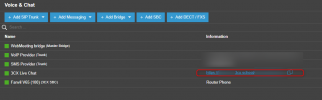
Your talk link should look like this, https:/pbxfqdn.3cx.school/LiveChat123456

This is what you would need to paste into your websites talk link

You can copy it directly from your Voice and Chat page

1720161947612.png
 
Status
Not open for further replies.

Forum statistics

Threads
112,147
Messages
590,961
Members
165,167
Latest member
Finatra.us