- Joined
- May 17, 2022
- Messages
- 1
- Reaction score
- 1
Hi Guys,
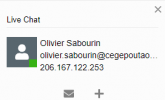
One of our clients uses the live chat feature on their website, when a customer goes to the live chat link they are prompted to put in their name and email address. If the entered email address is fairly long, the live chat window in the left hand pane cuts it off.
For example, let's say I put some details in of Name: 64BITBEN and Email: [email protected] it would then show up in the chat as:
64BITBEN
64BITBEN@thisemaiaddressdoes...
Hovering over the email address doesn't show the full thing either. There is an email button, which opens a new email, this is the current work around for viewing the full address. Is there anyway to 'expand' how many characters the live chat pane will show? I have tested in the Desktop Client and web client.
Currently running Version 18.0 Update 3 (Build 461) - I know there is a new wordpress pluging being released along side update 4, not sure if that resolves this issue?
I have also attached an example.
Regards
One of our clients uses the live chat feature on their website, when a customer goes to the live chat link they are prompted to put in their name and email address. If the entered email address is fairly long, the live chat window in the left hand pane cuts it off.
For example, let's say I put some details in of Name: 64BITBEN and Email: [email protected] it would then show up in the chat as:
64BITBEN
64BITBEN@thisemaiaddressdoes...
Hovering over the email address doesn't show the full thing either. There is an email button, which opens a new email, this is the current work around for viewing the full address. Is there anyway to 'expand' how many characters the live chat pane will show? I have tested in the Desktop Client and web client.
Currently running Version 18.0 Update 3 (Build 461) - I know there is a new wordpress pluging being released along side update 4, not sure if that resolves this issue?
I have also attached an example.
Regards