Live Chat Queue

Status
Not open for further replies.

Chris.Cable

Premier Customer
Joined
Apr 20, 2020
Messages
3
Reaction score
0
Hey we are really close to having this rolled out, but that last hurdle I need to cross is to remove full names and pictures from the chat. We want the chat participants to see a generic picture and a first name only. Right now, once the agent connects it changes the picture to the one that is in the 3cx system and also fills in their whole name. I feel this should be an easy fix but cannot seem to find where to implement it.
 
Hi @Chris.Cable,

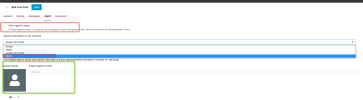
When you navigate to Web Client >> Admin section >> Live Chat configuration(Voice & Chat) >> Agent tab, you can disable the option "Show Agent's Name" and set the agent's name in the chat box to 'None'.

1682023036291.png


When the option is disabled(Show agent's name), the default photo and name will be shown.
 
I have both of those things implemented and it still shows. Once an agent takes the chat it switches from teh blank default over to the Full Name and picture from the 3cx profile
 
Status
Not open for further replies.

Forum statistics

Threads
112,148
Messages
590,962
Members
165,168
Latest member
Stephan Eusebe