Solved Live Chat Set Up but Not Working on Wordpress

Status
Not open for further replies.

Baz111191

New Customer
Joined
Feb 4, 2021
Messages
11
Reaction score
1
After setting up this plugin on WordPress using the guides provided, unfortunately, the plugin does not seem to work. The Live Chat Icon is where it should be but it is darkened out with a red cross over it when someone mouses over the Live Chat Icon. I checked that I didn't have the SSL issue discussed here. My SSL is CA-signed and I have been through the setup guides several times to try and ensure my WebClient, management console and plugin are all confirmed correctly. They seem to be but for some reason it is not working still.

Does anyone have any advice, please?


Kind regards,


Thanks
 
I guess you're close but no cigar.

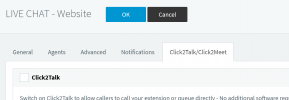
is this enabled under your queue?

if not, turn it on.

1612449631760.png

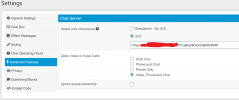
And make sure the Click2Talk URL matches whats in WP

1612449797903.png
 
  • Like
Reactions: VasilisV_3CX
Hi @Baz111191,

Can I confirm that you're using the 3CX version of live chat rather than the stand alone version?

EDIT:

After @kieferschild's update, that should get you there.
 
Last edited:
Do the URLs match EXACTLY, as in did you copy and paste the click2talk URL from your 3CX management? And, is your 3CX passing the firewall test?

If you take the URL from your PBX and browse to it in a browser, does it load correctly?
 
Do the URLs match EXACTLY, as in did you copy and paste the click2talk URL from your 3CX management? And, is your 3CX passing the firewall test?

If you take the URL from your PBX and browse to it in a browser, does it load correctly?
Thanks for your response again. Yes, I copied my Click2Talk link from my management console to my clipboard, then to settings in WP. As shown in your screen shots.

I just checked the Click2Talk link in my PC browser and that works fine, I can receive and send messages via my app on phone. Just struggling with implementing it onto my site.

All support is much appreciated.

Thank you,


Baz
 
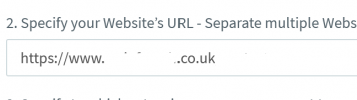
In the PBX go to Messaging > Your live chat

under point 2

can you try with just your root domain?

1612456178535.png
 

Attachments

  • 1612456163831.png
    1612456163831.png
    9.5 KB · Views: 5
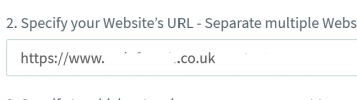
In the PBX go to Messaging > Your live chat

under point 2

can you try with just your root domain?

View attachment 20530
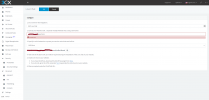
Hi, I just tried with the root domain and it says invalid URL, the extension of the domain name is '.partners', please see screenshot 3CX-Phone-System-Management-Console.png
 
can you try with https if you have it? or http
 
it is accepted with https://, however, this has not made it work on the site. the chat button still appears but shows the prohibited icon when you mouse over it.
 
If you right-click on the chat icon, in chrome on your website, and choose Inspect, then in the inspector on the right choose Console what is the resulting error?
 
If you right-click on the chat icon, in chrome on your website, and choose Inspect, then in the inspector on the right choose Console what is the resulting error?
Thanks for your response Charles, everything seems to be working just fine now.


Hope you have a good day.
 
  • Like
Reactions: NickD_3CX
Status
Not open for further replies.

Forum statistics

Threads
112,147
Messages
590,961
Members
165,167
Latest member
Finatra.us