Live Chat spacebar issue!

Status
Not open for further replies.

MuratDemirtas

Platinum Partner
Advanced Certified
Joined
Nov 27, 2018
Messages
178
Reaction score
35
Hi friends;

Spacebar not working when texting from website after live chat last update. There is no space between words, has anyone experienced this?

Take it easy everyone.
 
Hello Murat Demirtas,
Answer please a few questions:
How you embed LiveChat (via snippet from WebClient of you are using WordPress plugin?)
If WordPress Plugin -- which version?
What browser do you use, where you have this problem?
 
Hello;

Installed as a plugin on Wordpress
Wordpress version: 6.0.2
Livechat version: 10.0.5
Browser: edge

I didn't have this problem while using the previous version, but it happened a long time ago and then it got fixed (I think it was fixed in the released version), but after installing the last update, this problem came back again. I tried it on another computer using Chrome, same problem.
 
same issue here with a wordpress website and the wordpress plugin.
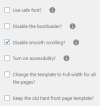
The theme must use smoothing scrolling i think...
 
Murat Demirtas, can you please send short screencase of how it goes?
 
Here, not only the spacebar but also the keyboard arrow keys do not work.
 
same issue here with a wordpress website and the wordpress plugin.
The theme must use smoothing scrolling i think...
1664963422716.png
Friendly you were right :) after doing that the live chat is back to normal, thanks. However, if it is still examined and a permanent solution is found, this issue will be completely closed in other updates. You can mark it as "Solved".
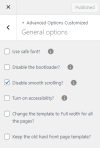
 
in my case, i have no option in theme to disable smoothing scrolling ...
so i'm still in the issue ...
 
in my case, i have no option in theme to disable smoothing scrolling ...
so i'm still in the issue ...
:) Under Appearance->Customize these settings, review them if you want, maybe you skipped it. The Turks have a saying, "A tailor cannot sew his own rip." you fit exactly in this situation right now :).

1664964254792.png
 
i confirm i don't have this option anymore... :confused:
 
Thank you, do you use wordpress theme from catalog, or custom?
 
Thank you, do you use wordpress theme from catalog, or custom?
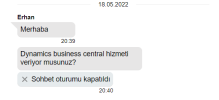
Hi, I have installed the theme from the catalog in wordpress. I even checked the past live chat requests. There was no problem in the correspondence on 18.05.2022.
1664969309207.png
 
it is a paid wordpress theme. dpr calibra
https://themeforest.net/user/dynamicpress

the only issue is with 3cx wordpress plugin, many other input text working well in all other pages (contact form and ...)
Maybe because 3cx plugin use "callus selector" and not a classic input ??
 
:) everything is possible
 
We investigate this issue. Your theme uses script, that captures space-key press event before we can process them.
So, the recommendation is not to use scripts that change the key-press behavior.
 
We investigate this issue. Your theme uses script, that captures space-key press event before we can process them.
So, the recommendation is not to use scripts that change the key-press behavior.
Thanks you for the analyse.
Now, we will search how disable this...

Just wondering why there is no effect on contact form for exemple

Have a nice day.
 
Because they add exception for these inputs. Our input created after page is loaded, so it's not affected by exception.
Anyway, we made some adjustments in live chat to work with these cases. We will update livechat with upcoming releases.
 
Last edited by a moderator:
  • Like
Reactions: troublestarter
When you change the style etc on the web chat it does not change on the web site? Do you need to do something on wordpress?
 
I too have this issue, and do not have an option to disable smooth scrolling. When does the updated web chat come out that will fix this?
 
  • Like
Reactions: troublestarter
Status
Not open for further replies.

Forum statistics

Threads
112,148
Messages
590,963
Members
165,168
Latest member
Stephan Eusebe