- Joined
- Dec 17, 2018
- Messages
- 6
- Reaction score
- 1
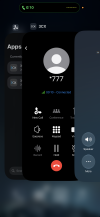
I am excited to try out the new Live Translation feature in 5.8, but I'm having some problems (which could well be user error). The blog posts announcing the feature state to open the Apple CallKit interface during the call, but don't provide instruction on how to do so. The only method I have found to invoke CallKit while on a call in the 3CX app is to have enabled "Prevent Lock to End Call" in my iOS accessibility settings and lock my screen during the call. When I wake the lock screen I see the CallKit interface with the "More" button. Is there a better/recommended way to invoke CallKit while on a 3CX app call?
I'm not sure if it's a function of invoking CallKit from the lock screen, but the other problem I have is the translation is only one-way... I can hear the AI translation of what the remote party is saying, but the translation of my reply is not being played back to them, they only hear my voice speaking my language. When I test calling from the native iOS dialer directly using my cellular calling plan, I hear the translation of the remote party in my language and they hear a translation of what I said in their language, which is what I expect should happen when using translation on a 3CX call.
I am using an iPhone 16 running iOS 27.01 and the production version of 3CX 5.8. Any assistance would be greatly appreciated.
I'm not sure if it's a function of invoking CallKit from the lock screen, but the other problem I have is the translation is only one-way... I can hear the AI translation of what the remote party is saying, but the translation of my reply is not being played back to them, they only hear my voice speaking my language. When I test calling from the native iOS dialer directly using my cellular calling plan, I hear the translation of the remote party in my language and they hear a translation of what I said in their language, which is what I expect should happen when using translation on a 3CX call.
I am using an iPhone 16 running iOS 27.01 and the production version of 3CX 5.8. Any assistance would be greatly appreciated.