Location of ringer ringtone for Windows desktop client

Status
Not open for further replies.

bmoreja

Customer
Joined
Apr 6, 2019
Messages
8
Reaction score
4
What is the name and where is the ringtone WAV file for the ringer desktop app located on Windows 11? I need to delete or rename it.

The ringer off feature does not work for me and I need to disable the Windows desktop app from ringing the calls in my headset. I can hear my desk phone ringing. The headset ringing on incoming calls is very very annoying.
 
  • Like
Reactions: tech10
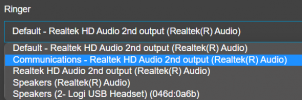
Hi using the desktop app is not possible to change the ringer. However you can choose where the ringer will be played

1703795800757.png
 
Hi using the desktop app is not possible to change the ringer. However you can choose where the ringer will be played

View attachment 38918

We're getting a lot of request on the possibilty of changing the ringtone in the clients as well. Just to be able to have a default preset of options would do the trick, no need to load ringtones themselfes.

Being able to have a auditive difference between queue calls en regular calls is just a big game changer.
I know there are a few idea threads about this, i've voted on all of them ;)


https://www.3cx.com/community/threads/change-ringtone-in-webclient.70639/
https://www.3cx.com/community/threa...ngtone-and-make-it-more-quiet-headset.114458/
https://www.3cx.com/community/threa...-and-external-calls-on-smartphone-apps.88458/
https://www.3cx.com/community/threa...s-on-windows-clients.48838/page-3#post-359794

Will there be any option to seeing this implemented in V20?
 
  • Like
Reactions: Tanis
Status
Not open for further replies.