Logged out receptionist still gets call from queue

ITSP

Premier Customer
Joined
May 4, 2022
Messages
69
Reaction score
10
Hi,

We have a situation where an out-of-office receptionist, even though logged out from the phone and the PC, still gets incoming calls routed to her first. The only way we could get her skipped in the agent list is when we put her phone on DND before logging out. Her account is fully logged out (but the PC still powered on and someone else is logged into it). Is this normal?

Their phone does not have enough buttons for us to assign 2 of them as Agent Sign In and Out buttons.
 
Have you considered to configure specific office hours for the user in order to automatically be set to DND and logout from the Queues?
 
If she's being polled first its because her extension is still live and logged in to the queue.

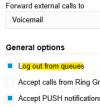
consider using the 3CX app to log out of the queue before leaving it if they still need to use their extension. Otherwise, do as Theo mentioned.

https://www.3cx.com/docs/pbx-queue-status/

You could also stick a piece of paper near the phone for them to log out with dial codes.

  • By default the dial code to log IN to a queue is *62
  • By default the dial code to log OUT of a queue is *63
 
The receptionist in question (and all other receptionists) do not have fixed times unfortunately or (in the case above), she is actually out sick and did not come in for the day so she could not log out of the app.

I had expected that when a user is NOT logged into a PC (and therefore does not have her Chrome browser logged in to 3CX) and her phone has been logged out using the BLF by a colleague, then 3CX should not consider her as logged in to the queue and skip her.
 
BTW, I have been arguing with them to use the DND button whenever they go on break or leave for the day but they are stubborn and don't want to use it because they might forget to unset DND when they are back. Ridiculous, I know.

But they do have a point: if an agent is not logged in to anything (not the 3CX mobile app, not the phone, and not the Chrome browser), then the system should not consider them as logged into the queue. Is there somewhere in 3CX where I can check where she might be logged in (that we don't know of)?
 
By "logged out from the phone" you mean logged out of the queue? Or hot-desking and logged out of a desk phone?

Closing the web browser / logging out of Windows does not change the extension status. But, the web client will then not ring of course. They would need to log out of the web client before closing it.

Similarly, if they did not uncheck their account in the mobile app that will still be connected.

Or they could just set their status to Away or DND or whatever, as noted. The web client has "Set status temporarily" which may help them use it.
 
  • Like
Reactions: ITSP
Mystery solved ... apparently, they don't log out of 3CX on their Chrome browser whenever they leave so the system stills sees them as logged in (even though they have logged out of the computer or even turned the PC off).

We'll update our documentation to say all receptionists must log out of 3CX in their browser at the end of each shift.
 
By "logged out from the phone" you mean logged out of the queue? Or hot-desking and logged out of a desk phone?

Hot-desking and logged out of the phone.

Closing the web browser / logging out of Windows does not change the extension status. But, the web client will then not ring of course. They would need to log out of the web client before closing it.

Yup, that's the culprit!
 
I have been arguing with them to use the DND button whenever they go on break or leave for the day

Point out if they set DND, they don't have to log out, or in each morning. :)

Edit: or technically other statuses depending on how they are set in the admin panel:
1774475532641.png
 

Latest Posts

Forum statistics

Threads
112,283
Messages
591,695
Members
165,406
Latest member
ARKC