- Joined
- May 29, 2025
- Messages
- 8
- Reaction score
- 2
HI all,
I have an issue where we had to upgrade the memory of our EC2 instance to upgrade to V20 and unfortunately we did not have an elastic IP setup so after reset the our FQDN is not working any more
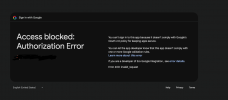
Is there a way to link the new FQDN without login into the management console? We had google login set up which gives an Auth error now, attached image below and we no longer have access to the standard username and password
Is there anyway to login to the console again and fixing the FQDN with the new elastic IP?
Many thanks in advance
I have an issue where we had to upgrade the memory of our EC2 instance to upgrade to V20 and unfortunately we did not have an elastic IP setup so after reset the our FQDN is not working any more
Is there a way to link the new FQDN without login into the management console? We had google login set up which gives an Auth error now, attached image below and we no longer have access to the standard username and password
Is there anyway to login to the console again and fixing the FQDN with the new elastic IP?
Many thanks in advance