Losing calls in queue

Status
Not open for further replies.

JesperITJV

Free User
Advanced Certified
Joined
May 14, 2024
Messages
40
Reaction score
2
Hello 3CX and community,

I have a customer who uses 3CX Pro 4SC. They have a queue with all of their employees in it, but only one has duty on the phone. So everyone else is set to unavailable if they don't have phone duty.

But somehow every once in a while, usually once or twice a day, they lose a call. I can see in the logs that the call is being sent to their mobile phone (3CX app on Android). but they don't actually get the call.

Last time this happend they saw a call coming in via the wallboard and it didn't get to their mobile, they set the status of a other phone to available and it did manage to get to that other phone. but it still didn't ring on the original phone of the person on duty.

Can I get some help debugging this problem?

Battery saving is disabled on all phones for the 3CX app.
 
You can check this guideline for more information regarding 3CX App troubleshooting.
 
Let us know the outcome
 
Let us know the outcome
Hello,

I've checked the phone of the customer.

1. Latest version.
2. Battery optimization is off
3. Background data is on
4. App has full permissions
5. DND is not enabled.
6. No other cleaner apps.
7. Firewall is fine
8. I cannot do this because the battery will drain, the problem with missing calls is random not all the time.
9. I can also not enable verbose logging because I don't know when the calls are missed, so I would need to enable this for the whole day...

What else can I do/check?
 
The issue occurs only on WiFi connection?
 
You will have to eliminate the issue regarding the connection.
I would suggest to monitor the issue while using only mobile data and check.
Furthermore ensure that in the firewall and DPI is disabled.
 
You will have to eliminate the issue regarding the connection.
I would suggest to monitor the issue while using only mobile data and check.
Furthermore ensure that in the firewall and DPI is disabled.
There is no firewall. 3CX is hosted on a Contabo VPS.

I don't think they like to turn wifi off because they don't have a big data plan.

Is there something I need to disable in their modem?
 
This is not something that can be advised from here or troubleshoot.
In any case you need to check this with logs from both the PBX and the Android app and must be in verbose.
Since the PUSH is sent from the PBX you need to check your network on the app location.
 
This is not something that can be advised from here or troubleshoot.
In any case you need to check this with logs from both the PBX and the Android app and must be in verbose.
Since the PUSH is sent from the PBX you need to check your network on the app location.
It is happening a lot again. I've enabled verbose logging on the PBX.

You say you need to check your network on the app location, does this mean the WiFi network might be blocking something on where the app is connected?

I have asked if they notice this again, if they can turn of WiFi and check if it still doesn't come in.

EDIT:

It has happened again, In the tunnel log i can see some lines complaining about TLS or SSL errors:

11:55:23.539|7f899c5ed6c0|Error|TLSTransp.cpp(536): Error 1 reading from TLS connection on socket (32): error:0A000126:SSL routines::unexpected eof while reading
11:55:23.539|7f899c5ed6c0| Warn|TLSTransp.cpp(563): ERROR_SSL on SSL_read

If you want the full log I can sent it via private message because there is alot of IP addresses in it.
 
Last edited:
This is not something that can be advised from here or troubleshoot.
In any case you need to check this with logs from both the PBX and the Android app and must be in verbose.
Since the PUSH is sent from the PBX you need to check your network on the app location.
Hi, sorry for double message,

Is there anything you can tell about the log in my message above?
 
@JesperITJV

Are you using a 3CX Generated Lets Encrypt Certificate or your own?

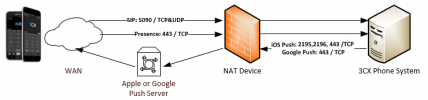
You need to make sure that nothing is blocked on the WiFi network: https://www.3cx.com/docs/manual/firewall-router-configuration/
View attachment 41636
Hi Jed,

I am using the 3cx generated certificate, and it is still valid as far as I can see (the web gui is still valid).

All of the ports are opened on the VPS that is hosted by Contabo.com.

The WiFi network doesn't block anything as far as I know, most of the calls are received via the app but a few are not recevied.
 
I am using the 3cx generated certificate, and it is still valid as far as I can see (the web gui is still valid).

All of the ports are opened on the VPS that is hosted by Contabo.com.

The WiFi network doesn't block anything as far as I know, most of the calls are received via the app but a few are not recevied.

We have a customer using Android over WiFi as the only connection to the system, and it works now. They had to adjust the WiFi AP´s to make sure they didn't lose the connection (they added a few AP´s and lowered the power on all, to make sure all were selecting the AP Closest to them).

And just to make sure the basic is OK.
Your 3CX server is running the newest version 18. Update 9 (Build 31), right?

As @TheodorosG_3CX said, the best and only way to eliminate the WiFi as the source is for the person on duty to run a day with Mobile Data, to see if this solves the issue (it usually does solve the issues, and it will prove that you have to look at the WiFi).

Hope this helps
 
  • Like
Reactions: TheodorosG_3CX
We have a customer using Android over WiFi as the only connection to the system, and it works now. They had to adjust the WiFi AP´s to make sure they didn't lose the connection (they added a few AP´s and lowered the power on all, to make sure all were selecting the AP Closest to them).

And just to make sure the basic is OK.
Your 3CX server is running the newest version 18. Update 9 (Build 31), right?

As @TheodorosG_3CX said, the best and only way to eliminate the WiFi as the source is for the person on duty to run a day with Mobile Data, to see if this solves the issue (it usually does solve the issues, and it will prove that you have to look at the WiFi).

Hope this helps
It is not on version 18 but version 20.

VERSION = 20.0.1.731

Also had this problem on older version 18.


I asked them if they see it happening switch to mobile network to test. Lets wait for them to test this.
 
  • Like
Reactions: jed
Let us know the outcome
 
Let us know the outcome
Hello,

After some testing, they confirmed after switching to 4g mobile the phone call comes in about 10-20 seconds after switching to 4g network.

The weird thing is, this problems occurs random, most of the time the call comes in on WiFi jus tfine but every day one or 2 calls are missed (sometimes 5-10 calls)

So yes, switching to 4G helps when there is a call waiting but not received on their phone.
 
This can indicate a network related issue.
Check whether there is any DPI running on your firewall.
 
This can indicate a network related issue.
Check whether there is any DPI running on your firewall.
I don't think there is, they receive calls from home and just have a simple modem from their provider...
 
Status
Not open for further replies.

Forum statistics

Threads
112,149
Messages
590,964
Members
165,170
Latest member
SupportRock