- Joined
- Dec 26, 2024
- Messages
- 3
- Reaction score
- 0
Forgive me for posting a redundant question, but I'm having issues piecing the puzzle pieces together.
SETUP
* Country US
* 3CX Hosted Enterprise Version 20.5
* 13 users configured, let's say 30 SIP devices/apps/softphones behind the SBC
* a Few Yealink T57W all up to date,
* tech's using Softphone on Windows 11 kept updated.
* Tested on PWA client
* SBC: Debian local Virtual (8 GRAM, 2 proc, 50G HDD) with 3CX SBC same version as PBX.
ISSUE: Users have complained about mostly low call volume levels during a call for a period of time, and then all the time on some calls.
TROUBLESHOOTING
I found a configuration issue where G.729 was configured and SipTrunk.com using PCMU. I have since changed it to PCMU across the board on the 3CX.
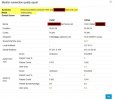
my call monitors on all were showing:
* "Network problems between PBX and [number] SipTrunk.com"
* Mode Transcoding
* Codec PCMU - G729, PCMU - PCMU
I found the article about what causes transcoding, and I was using "audio through PBX," as I thought that would be easier to keep security tight. As I understand it, the SBC would route SIP and RTP through it to the PBX and vice-versa. I turned this option off on my extension and made a test call, but the same issue arose on the call monitor, although I had PCMU on both legs and, audio through PBX, off in my extension, it was still transcoding. The call monitor shows the same and no change when the volume issue occurs and does not.
The low volume occurs on all devices; phone, softphone, PWA. It is intermittent, on ext to ext, and external calls. All call monitors show issues with network between SipTrunk.com and 3cx hosted PBX. I have had a ticket open with SipTrunk.com since last week.
QUESTIONS
1. I wouldn't think that "network issues" would cause an issue with the volume level of a call as my understanding is this is set and "inside" the packet. However, I would like to see a clean report so that is not an issue anywhere else.
2. I wouldn't think the transcoding could cause this issue as the codec is decompressed, modified, and reassembled as the other codec. But is 3cx really transcoding from PCMU to PCMU, in other words, opening the packet and re-assembling it?
3. Where should I look next, and should I include support now for at least the Network issues between the PBX and SipTrunk.com, or both?
SETUP
* Country US
* 3CX Hosted Enterprise Version 20.5
* 13 users configured, let's say 30 SIP devices/apps/softphones behind the SBC
* a Few Yealink T57W all up to date,
* tech's using Softphone on Windows 11 kept updated.
* Tested on PWA client
* SBC: Debian local Virtual (8 GRAM, 2 proc, 50G HDD) with 3CX SBC same version as PBX.
ISSUE: Users have complained about mostly low call volume levels during a call for a period of time, and then all the time on some calls.
TROUBLESHOOTING
I found a configuration issue where G.729 was configured and SipTrunk.com using PCMU. I have since changed it to PCMU across the board on the 3CX.
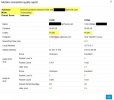
my call monitors on all were showing:
* "Network problems between PBX and [number] SipTrunk.com"
* Mode Transcoding
* Codec PCMU - G729, PCMU - PCMU
I found the article about what causes transcoding, and I was using "audio through PBX," as I thought that would be easier to keep security tight. As I understand it, the SBC would route SIP and RTP through it to the PBX and vice-versa. I turned this option off on my extension and made a test call, but the same issue arose on the call monitor, although I had PCMU on both legs and, audio through PBX, off in my extension, it was still transcoding. The call monitor shows the same and no change when the volume issue occurs and does not.
The low volume occurs on all devices; phone, softphone, PWA. It is intermittent, on ext to ext, and external calls. All call monitors show issues with network between SipTrunk.com and 3cx hosted PBX. I have had a ticket open with SipTrunk.com since last week.
QUESTIONS
1. I wouldn't think that "network issues" would cause an issue with the volume level of a call as my understanding is this is set and "inside" the packet. However, I would like to see a clean report so that is not an issue anywhere else.
2. I wouldn't think the transcoding could cause this issue as the codec is decompressed, modified, and reassembled as the other codec. But is 3cx really transcoding from PCMU to PCMU, in other words, opening the packet and re-assembling it?
3. Where should I look next, and should I include support now for at least the Network issues between the PBX and SipTrunk.com, or both?