- Joined
- Oct 8, 2024
- Messages
- 6
- Reaction score
- 3
PBX Version: 20.0
Hosted by 3CX
As the title suggests, I've enabled the M365 Integration, following the recommendations from the support article here: https://www.3cx.com/docs/manual/microsoft-365/. (of course I've not done everything the same).
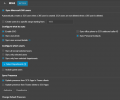
The settings I've applied are shown in the screenshot below. (for clarification, I'm syncing a single department which has only a handful of users for testing purposes).
So with this being said, now when I try to login with one of these synced accounts, the login screen just bounces back. As in I click on "Sign in with Microsoft" at the login screen
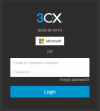
I get redirected to the Microsoft login page (running in private for test purpose)
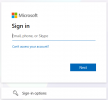
And then I'm brought back to the 3CX login screen, and clicking on the "Sign in with Microsoft" button again just reloads through M365 login page and then back to 3CX login page.
Hopefully there is something simple I'm missing, and hopefully someone can very obviously point it out
What I've done.
Hosted by 3CX
As the title suggests, I've enabled the M365 Integration, following the recommendations from the support article here: https://www.3cx.com/docs/manual/microsoft-365/. (of course I've not done everything the same).
The settings I've applied are shown in the screenshot below. (for clarification, I'm syncing a single department which has only a handful of users for testing purposes).
So with this being said, now when I try to login with one of these synced accounts, the login screen just bounces back. As in I click on "Sign in with Microsoft" at the login screen
I get redirected to the Microsoft login page (running in private for test purpose)
And then I'm brought back to the 3CX login screen, and clicking on the "Sign in with Microsoft" button again just reloads through M365 login page and then back to 3CX login page.
Hopefully there is something simple I'm missing, and hopefully someone can very obviously point it out
What I've done.
- I've attempted to re-configure the M365 integration (using different settings / tick boxes)
- I've deleted the users that were being synced and allowed M365 to create them (no change)
- I've created the user (which is what we'd like as we want everyone to keep the same extension number from the old system), and synced not working.
- Upon request, I've deleted another system I had in my account under the: https://portal.3cx.com/customer/systems. This hasn't worked
- M365 email, sending as expected
- SharePoint, for back-up and external storage.