Solved MagentaZuhause L Regio SIP %40

Status
Not open for further replies.

BenRyde

Free User
Joined
Jun 11, 2019
Messages
8
Reaction score
1
Hello everybody,

I have the following problem:
I changed the tariff at telekom to MagentaZause L Regio. I got new access data for this. at the sip registration I enter the data as follows:

Registrar / Server / Gateway: host name or IP address

tel.mzregio.de
Port 5060

Outgoing proxy
-
-

authentication type
based on registration / account

Authentication ID (SIP User ID)
[email protected]

Authentication password
contract password

3-way authentication password
check
e-mail address

In the protocol, I now see the following:
Call or Registration to Deutsche Telekom 1234567890 has failed. sip: 1234567890% [email protected]: 5060 replied: 401 Unauthorized; from IP: 213.148.137.6: 5060

I understand the problem now so that the user is wrong, because the @ sign is converted to% 40 and the telekom can do nothing with it.

Am I correct?

if so, can I adjust somewhere in the plant that the @ sign is not changed in html language?

many thanks for your help!
 
Hi @BenRyde

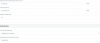
You can try doing it this way:
10997

The PBX should construct the correct link now
 
hey john,

Thanks for the tip, unfortunately not working. the message comes:

Call or Registration to Deutsche Telekom 123456789 has failed. sip: [email protected]: 5060 answered: 503 No DNS results; warning: No other DNS entries to try (0,0); internal

I just noticed that my numbers are not included in my contract or have been transferred. probably there is a mistake in the telekom. Let's see what they say.
 
...Unfortunately does not work. So probably not the telekom. Does somebody still have an idea?
 
did you run a capture again to see what gets sent out while using the method I posted above?
 
yes I have done, it takes a while and then comes this error message:

Call or Registration to Deutsche Telekom 123456789 has failed. sip: [email protected]: 5060 answered: 503 No DNS results; warning: No other DNS entries to try (0,0); internal

the registration goes out to be correct, no idea what this error now means ...
 
I cannot resolve mzregio.de from here. Can you confirm if this domain only exists on your provider's private network?

Do you have 2 separate connections? (one to the internet provider and one to the trunk provider?)

If the system cannot resolve the domain name then it will not know where to contact the trunk provider so you might have to do some extra work on the networking side for the PBX to reach Regio
 
I think the problem is that the pbx tries to log in to mzregio.de. the correct registrar is tel.mzregio.de

I can resolve both addresses via https://mxtoolbox.com.

I think the problem is the @ sign.

correctly it should read:

sip:[email protected]@tel.mzregio.de:5060
 
Hi Ben,

The error you posted above seems to reveal that the PBX did not reach their server at all.

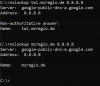
Also did a quick nslookup here and got nothing. Can you log into the PBX via command line and try to resolve those domains?
11017


When using the Proxy field that i mentioned above, it means that the PBX will try to register to whatever is in that box (so tel.mzregio.de)

It will use whatever is in the AuthID+Registrar boxes in order to build the username (so [email protected] in our case).

If you look at the capture while the system tries to register, you should first see the DNS queries (and what reply the system gets) and then you should see it trying to register by sending the registration packets to the IP that sits behind tel.mzregio.com and with user [email protected]
 
hey,

've made the nslookup. same result as you, can not be resolved.

that means it is due to the network settings?
you talked about it in the upper post ...

my network is configured as follows:

server with virtual firewall (sophos) and virtual pbx (3cx), both machines are windows 10.

the modem of the telekom (speedport) is in bridged mode, ie. the sophos makes the pppoe connection. works wonderfully.

firewall check the 3cx was successful, have set up a dnat with the 3cx ports. I also set up a snat, all ports are allowed here. So the connection from and to the pbx would have to run.

do you need more info?
 
Firewall ayarlarınızı kontrol etmenizde fayda var, ayrıca 3cx firewall check yapıp kontrol edin. DNS çözümleme sorunu var gibi veya hizmet aldığınız operatör pbx ip adresinizi engelliyor olabilir.

You should check your firewall settings and check and check your 3cx firewall. The DNS pbx operator may be blocking your ip address as there is a DNS resolution issue or the service you are receiving from.
 
hey,

've made the nslookup. same result as you, can not be resolved.

that means it is due to the network settings?
you talked about it in the upper post ...

my network is configured as follows:

server with virtual firewall (sophos) and virtual pbx (3cx), both machines are windows 10.

the modem of the telekom (speedport) is in bridged mode, ie. the sophos makes the pppoe connection. works wonderfully.

firewall check the 3cx was successful, have set up a dnat with the 3cx ports. I also set up a snat, all ports are allowed here. So the connection from and to the pbx would have to run.

do you need more info?

The networks settings will depend on the above. Our system supports these types of network configuration: https://www.3cx.com/blog/docs/network-configurations-supported-3cx-phone-system/

What type is yours? Do you have two modems, one for internet access and one for SIP trunk or does you provider give one modem with both services together?
 
@Murat
I've already done that, the firewall check says everything is ok. I can not imagine blocking, with the same provider, the whole with other access data worked well before, everything was fine. the only change in the system is the sip access data (the additional @) from the provider.

@John
I have a simple network, one modem which establishes the connection to the provider. over it also the telephony runs. as I said, everything has worked wonderfully before, only since the @ is unfortunately not anymore ... Of course, the modem could also take over the dial-up Internet or the telephony as well. but I do not want that, because I have more control over the sophos or 3cx.

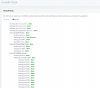
11027
 
  • Like
Reactions: MuratDemirtas
Can you try, with your first settings again? And then remove the "@mzregio.de" from the authenthitication ID?
 
I just talked to the telekom. in my new contract sip trunking by third parties is not allowed. So it's no wonder it will not work. I will now create an account with any voip provider ... would you have known everything before :)

many thanks for your help!!!
 
Hi Ben,

Glad it was resolved then, if you need any help with the new provider you can start a new post.

I would recommend taking a look at our supported providers before you choose, as they have been tested for interoperability with the 3CX system https://www.3cx.com/partners/voip-providers/
 
  • Like
Reactions: MuratDemirtas
Status
Not open for further replies.

Forum statistics

Threads
111,928
Messages
589,774
Members
164,799
Latest member
RicoDinero