Management Console restricted to IP blocks all access

Status
Not open for further replies.

atmomin

Bronze Partner
Advanced Certified
Joined
Nov 5, 2019
Messages
24
Reaction score
3
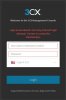
Due to too many recents attacks, I just locked my Management console access to my current WAN IP. But now, management console login does not work from anywhere including my current WAN IP. How do I get back MC access?

This is definitely a bug. I was well aware of the consequences of doing this, but I couldn't think of any other way to protect for now, but this has backfired and locked me out compeletely.

Anyone with any idea?
Thank you.
 

Attachments

  • 3cx-login.jpg
    3cx-login.jpg
    18.3 KB · Views: 18
3CX is pretty good at blocking hack attempts on it's own, and if you wanted to go to extremes, you are better off doing that with a proper firewall. Since you indicate that you left access open , to your current public IP, I have to assume your IP has changed, or you have been locked out, for a period of time, because of too many failed attempts, from that IP. You may just have to wait a while.
 
  • Like
Reactions: BrenttG
I am 100% sure IP hasn't changed and also I can't be locked out, because I have saved password in browser I use every time.

It locked me out immediately after applying IP restriction, it's not I did it few days ago and something happened in these few days. As I said I was well aware of the consequences, so, I double checked IP before applying.

I hope others will have some idea.
 
Are you able to VPN in as a "local" IP?
 
No, I don't think it would let me since the IP restriction is in effect.
 
You'll have to get on the local subnet for your PBX and access MC that way.

Otherwise, you'll have to do it from your PBX - Im not sure on your set up so this may be difficult for you.

I believe its possible to SSH to the PBX and edit the allowed IP addresses, if you do a search on here you should find it. (https://www.3cx.com/community/threads/web-portal-locked-out-completely.69139/)

see post 8
 
@atmomin I'm not so sure this is a bug, I locked a cloud PBX to my current WAN IP and can still get in.

It really depends on your network setup and what exactly you typed in the box.
If you entered the wrong information, there will be a mismatch -> locked out
If you are behind a double NAT, even if you enter the correct details -> locked out
So basically a mismatch is what is likely happening now.
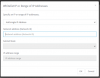
1594039999501.png
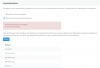
If you enter it wrong, check before you press the big OK button:
You will see a big red box warning you that your current address is restricted
1594040569330.png
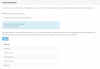
Once you enter it correctly it will turn blue informing you it's now allowed
1594040736568.png
You may now finally press the big OK button on the top of the page.

If you have SSH access to the machine, message me and I can help you unlock it.


Security Note:
Hacking attempts = if you mean you saw many blacklisted IP appearing in your PBX, those are attempts to register to the SIP server port. Console restrictions apply to the management console login only and would have not helped in this scenario.
 
@JohnS_3CX it's on Google cloud, I haven't tried SSH, but it should be accessible.

I realized my mistake that the IP was correct but it was showing that light red color. Silly me, I didn't realize the restricted word in that context. I think it should be reworded to "current IP address is not allowed"..

Thanks a lot for the explanation with screenshot. I will private message you.
 
Status
Not open for further replies.

Latest Posts

Forum statistics

Threads
111,953
Messages
589,916
Members
164,851
Latest member
DrunkeMeister