Manager/Owner cannot see Call Details in new reporting features "Inbound/Outbound Calls" after V20 u6 upgrade

cpe90

Customer
Joined
Mar 7, 2023
Messages
78
Reaction score
19
1756158165645.png
1756156788148.png
1756156801022.png
1756156898263.png
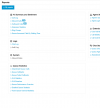
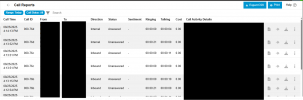
After updating from v20 u5 to v20 u6 we found there has been a large overhaul of the reporting features which has changed a lot of the ways reporting is displayed and sorted. We depended on the "Call Reports" feature to track and gather data for certain areas of our business but now that has been moved to the "Inbound/outbound calls" reporting features.

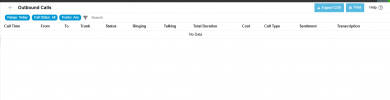
The issue here is only users with the highest level of Privileges "System Owner's" can view the data from the Inbound/Outbound Calls feature otherwise when Manager's or Owner's access these features it says there is no data.

We have tried the Inbound/Outbound Calls feature under a user with System Owner privileges, and it does work.

Why are manager's and owner's given access to view those reports but cannot pull call data to actually be able to utilize the feature? Also is there a way to fix this so Manager's and Owner's can view this data?
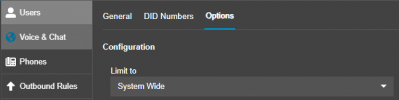
 
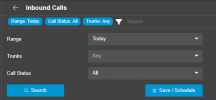
Those reports require either the user in question to have the system admin role, or for the trunk to be changed from "Limit to System Wide" to be limited to a specific department. If you are looking at the inbound/outbound report you'll see a Trunk dropdown so if all trunks are set to system wide then they are not included in any Department permissions
1756170581725.png
If the user is not a system admin, and no trunks are configured as limited to a specific department, then the user will not see any trunks in the dropdown and in turn see no results in the report

1756170653060.png
 
Got it, so if we end up changing this setting in our Sip Trunk to limit to a specific department instead of System Wide, will that affect System Admin's privileges to be able to pull reports for that trunk?

Also, when going to change my Sip Trunk's "Limit To" option I received this warning:
1756218735991.png
When making this change what other settings do I need to modify or take a look at in order to not disrupt our system?
 
Got it, so if we end up changing this setting in our Sip Trunk to limit to a specific department instead of System Wide, will that affect System Admin's privileges to be able to pull reports for that trunk?

Also, when going to change my Sip Trunk's "Limit To" option I received this warning:
View attachment 49123
When making this change what other settings do I need to modify or take a look at in order to not disrupt our system?
System Admins I believe are able to see everything by default, regardless of department configuration/membership.

Check your outbound rules to see if they are limited to certain departments, I am not 100% sure but based on the language I assume that if an outbound rule is limited to a specific department, and the trunk in question is not a member of the department then it could impact that. Similarly if the outbound rule has one trunk as the first route, and a different trunk as the second route, then you may have weird behavior if a user goes to dial out, doesn't have access to the trunk department, and thus the outbound rule skips a route
 
Those reports require either the user in question to have the system admin role, or for the trunk to be changed from "Limit to System Wide" to be limited to a specific department. If you are looking at the inbound/outbound report you'll see a Trunk dropdown so if all trunks are set to system wide then they are not included in any Department permissions
View attachment 49120
If the user is not a system admin, and no trunks are configured as limited to a specific department, then the user will not see any trunks in the dropdown and in turn see no results in the report

View attachment 49121
system admin role can't see any reports. only thing that actually works if your trunks are system wide is system owner.1756836853986.png
 
I have 3 sip trunks set up that are all used by all departments. if i limit to a department can other departments still use the trunks?
 

Forum statistics

Threads
111,956
Messages
589,927
Members
164,858
Latest member
MichaelRussell3