Solved Mapping DID to Key on Phone

Status
Not open for further replies.

mtcs

SOHO User
Joined
Oct 30, 2023
Messages
2
Reaction score
2
I moved from a traditional Toshiba PBX system to 3CX with SIP trunk. How do I tie a DID to a button on my Yealink T46U. Before, each line was tied to a key on the phone -- so when one line rang, I could distinguish immediately which line was ringing by looking at which button on the phone was blinking. For the life of me, I cannot figure out how to do this. I know that the DIDs are virtual with SIP and it's different, but it seems like such a basic function that I cannot find. Here is what I want:

Call incoming on DID A > key 1 starts blinking
Call incoming on DID B > key 2 starts blinking

When I press key 1 and dial a number, I want my outbound caller ID to show DID A.
When I press key 2 and dial a number, I want my outbound caller ID to show DID B.

Also, I have Pro, not sure why it says i'm a SOHO user.
 
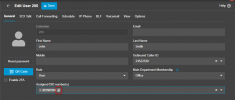
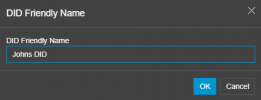
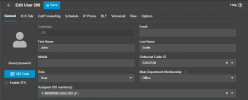
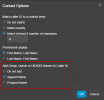
We do this distinction from the name of the DID. Just give your DID a name, and since you are already looking at the phone, you will know exactly which DID is ringing.

1746510291909.png

1746510309695.png

1746510324729.png

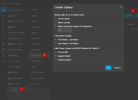
To show this information you will need to enable this in the phonebook options

1746510421185.png

Append will put the name of the DID after the callers caller ID.
Prepend will put the name before the caller Id of the caller.

1746510368324.png
 
  • Like
Reactions: mtcs
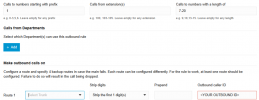
For outgoing calls you can crate an outbound rule. When you want to dail with number A, in stead of pressing button 1, just start with dailing 1<telephone number>, for number B, 2<telefon number>
In outbound rules create a rule

1746519324216.png

Enter the trunk you are using and the outbound ID.
I've set the length of the number 7-20, so I can use extention numbers starting with 1
 
To achieve exactly what you want, unfortunately, means modifying a template, to allow assignment of different extensions to each key. This renders the phone unsupported.

If you did assign a different extension to each key, then DIDs could be routed to the desired key, and each extension (key) could have a different outbound caller ID assigned.

For some reason, and I have to assume it is because of the expected increase in the number of trouble tickets, 3CX prefers one extension per set.
 
  • Like
Reactions: Evolute IT
We do this distinction from the name of the DID. Just give your DID a name, and since you are already looking at the phone, you will know exactly which DID is ringing.

View attachment 47727

View attachment 47728

View attachment 47729

To show this information you will need to enable this in the phonebook options

View attachment 47731

Append will put the name of the DID after the callers caller ID.
Prepend will put the name before the caller Id of the caller.

View attachment 47730
Thanks. I ended up doing this and removing inbound CID on my lines so it just shows X ring group or Y DID.
 
Status
Not open for further replies.