Mercury CRM integration

Status
Not open for further replies.

robausirl

Gold Partner
Advanced Certified
Joined
Nov 26, 2020
Messages
28
Reaction score
5
Hi All,

I've got anew client that is using the below API. I've managed to simulate a test with postman and can confirm access and pull test data so I know my API key etc is working.

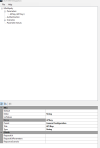
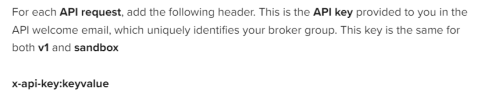
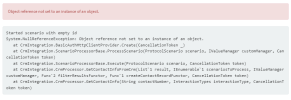
I'm struggling with the 3CX Template Generator portion as I've followed all the prompts and seem to have hit a wall and getting a response stating "message":"No API key found in request". I've not had to enter the API key as yet so I'm sure it's a config issue but i'm not sure on how to format the request using the generator so I can test etc. From reading the API documentation it seems to want the format of x-api-key:keyvalue with keyvalue being the API key I've been provided by the vendor.

https://wiki.connective.com.au/en/articles/633-getting-started-with-mercury-api

Any and all help is greatly appreciated so I can wrap my head around this and get a test working.

Kind Regards,
Rob
 

Attachments

  • Screenshot 2023-05-02 215923.png
    Screenshot 2023-05-02 215923.png
    16.5 KB · Views: 6
  • Screenshot 2023-05-02 215910.png
    Screenshot 2023-05-02 215910.png
    21.1 KB · Views: 6
  • Screenshot 2023-05-02 215807.png
    Screenshot 2023-05-02 215807.png
    26.6 KB · Views: 6
Just putting a parameter is not enough. You need to tell the template where to use that API key. Either as query param, post body, or headers.
 
  • Like
Reactions: edossantos
Just putting a parameter is not enough. You need to tell the template where to use that API key. Either as query param, post body, or headers.
Thanks for the swift response.

What and where should I be putting this info? It's a header I need to input as that is what I've done in Postman to get it working... But where and how in the generator app???

The tab Parameter Values looks to be for debug/test purposes only. This is my first time creating a custom CRM integration as I've done ConnectWise and other native ones that are supported and they worked great. This time I'm stepping into the unkown and the CRM support vendor just keeps sending me back to the documentation link I linked in the original post.

The fact I have it working in Postman means I'm close and I feel it's just the format 3CX generator is using.
 
Thanks for the swift response.

What and where should I be putting this info?

The tab Parameter Values looks to be for debug/test purposes only. This is my first time creating a custom CRM integration as I've done ConnectWise and other native ones that are supported and they worked great. This time I'm stepping into the unkown and the CRM support vendor just keeps sending me back to the documentation link I linked in the original post.

The fact I have it working in Postman means I'm close and I feel it's just the format 3CX generator is using.
The generator wizard should do most of it for you.

Start by scraping your file, and in the app, use File > New > New Tempate Wizard. It will ask for the auth setup and all.

It all depends on the CRM itself and I haven't checked the docs for it.
 
The generator wizard should do most of it for you.

Start by scraping your file, and in the app, use File > New > New Tempate Wizard. It will ask for the auth setup and all.

It all depends on the CRM itself and I haven't checked the docs for it.
Yeah did that already and went back over the setup multiple times and it never asks for the key or provides any clarity on how to get it into the headers of the GET request.... Very confusing.
 
The API indicates that you need to include a header in the HTTP request:
1683031278617.png


This is not a standard authorization method, so the wizard will not do this for you. The wizard will create a working template if you need to use basic authentication or OAuth2. Otherwise you need to do it yourself. You will need to add the header to each request. You can see how we do this for example in the template we have for Zendesk. It should be something like this:
XML:
      <Request Url="YOUR_URL" RequestType="Get" ResponseType="Json">
        <Headers>
            <Value Key="x-api-key">[YOUR_API_KEY_PARAMETER]</Value>
        </Headers>
      </Request>
 
  • Like
Reactions: Evolute IT
The API indicates that you need to include a header in the HTTP request:
View attachment 35329


This is not a standard authorization method, so the wizard will not do this for you. The wizard will create a working template if you need to use basic authentication or OAuth2. Otherwise you need to do it yourself. You will need to add the header to each request. You can see how we do this for example in the template we have for Zendesk. It should be something like this:
XML:
      <Request Url="YOUR_URL" RequestType="Get" ResponseType="Json">
        <Headers>
            <Value Key="x-api-key">[YOUR_API_KEY_PARAMETER]</Value>
        </Headers>
      </Request>

Ah ok cool. I was expecting that I had to get it right in the generator app with the wizard. So i'm guessing i still can't test this in the generator app and will instead need to test on a 3CX after I upload the code?
 
Ah ok cool. I was expecting that I had to get it right in the generator app with the wizard. So i'm guessing i still can't test this in the generator app and will instead need to test on a 3CX after I upload the code?
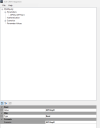
You can still use the 3CX Template Generator tool for testing. You just need to add that header manually. You can do this by editing the XML file with a text editor, or you can also do it from the tool. You will need to find the Request element, go to the Properties window, find the Headers collection, and add your header. Both methods are valid and produce the same output.
 
  • Like
Reactions: Evolute IT
You can still use the 3CX Template Generator tool for testing. You just need to add that header manually. You can do this by editing the XML file with a text editor, or you can also do it from the tool. You will need to find the Request element, go to the Properties window, find the Headers collection, and add your header. Both methods are valid and produce the same output.

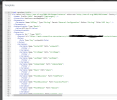
Ok I've modified the xml file and added the headers section just after Request URL and before Rules... However it's still not working and also I can see that when I upload to 3CX and click show template the headers sections disappears. I've confirmed it's 100% in the file that I'm uploading.
 

Attachments

  • Screenshot 2023-05-02 230107.png
    Screenshot 2023-05-02 230107.png
    90.6 KB · Views: 6
I've removed the lookup by email portion and managed to get it to a point that it states the CRM integration is working, however it's stating my contact number lookup is not working and to check the log. How can I find this log exactly?

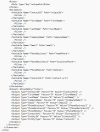
Also I'm wondering if it's because I'm not somehow matching the rule it's expecting. See attached my config of rules etc. Any idea on what might be a miss still?
 

Attachments

  • Screenshot 2023-05-02 232639.png
    Screenshot 2023-05-02 232639.png
    69.5 KB · Views: 3
  • Screenshot 2023-05-02 232404.png
    Screenshot 2023-05-02 232404.png
    5.5 KB · Views: 3
You can still use the 3CX Template Generator tool for testing. You just need to add that header manually. You can do this by editing the XML file with a text editor, or you can also do it from the tool. You will need to find the Request element, go to the Properties window, find the Headers collection, and add your header. Both methods are valid and produce the same output.

I think it might be my contact URL that's been created. Ignore the X's and Y's in the attached but this is how I'm looking up a contact doing a query. What is 3CX generator wanting in return exactly as I think my response is not formed correctly and might be my issue?
 

Attachments

Last edited:
Can you show the JSON response returned by the CRM, and the details of the template where you analyze this response (variable mapping)?
 
Can you show the JSON response returned by the CRM, and the details of the template where you analyze this response (variable mapping)?
Where can I find this in 3CX logs?
 
Where can I find this in 3CX logs?
Enable verbose logs from the 3CX Console > Dashboard > Activity Log > Settings. Then make a test call where you reproduce the issue, and check the 3cxSystemService.log file that you can download from the 3CX Console > Dashboard > Activity Log > Logs button > Instance folder.
 
Enable verbose logs from the 3CX Console > Dashboard > Activity Log > Settings. Then make a test call where you reproduce the issue, and check the 3cxSystemService.log file that you can download from the 3CX Console > Dashboard > Activity Log > Logs button > Instance folder.
See attached the log file. I see some items relating to the CRM but nothing that tells me about format expected etc.

Also see attached the XML template file i'm using.

Let me know your thoughts.
 

Attachments

Your contact lookup scenario has the Id="LookupByPhone", however contact lookup scenarios should have an empty Id. Remove the ID and try again.
 
Your contact lookup scenario has the Id="LookupByPhone", however contact lookup scenarios should have an empty Id. Remove the ID and try again.
Ah yes I added that during testing as I noticed the email lookup had an ID. I've removed it and now getting the attached error.
 

Attachments

  • Screenshot 2023-05-10 195957.png
    Screenshot 2023-05-10 195957.png
    32.9 KB · Views: 3
Ah yes I added that during testing as I noticed the email lookup had an ID. I've removed it and now getting the attached error.
Your template specifies that it has to use Basic Authentication, however you're not setting a value. This is how you're specifying this:
XML:
  <Authentication Type="Basic">
  </Authentication>

And this is for example how we do it for Freshdesk:
XML:
  <Authentication Type="Basic">
    <Value>[APIkey]:X</Value>
  </Authentication>
 
  • Like
Reactions: Evolute IT
Your template specifies that it has to use Basic Authentication, however you're not setting a value. This is how you're specifying this:
XML:
  <Authentication Type="Basic">
  </Authentication>

And this is for example how we do it for Freshdesk:
XML:
  <Authentication Type="Basic">
    <Value>[APIkey]:X</Value>
  </Authentication>
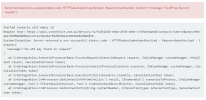
I originaly had that code in my file, however I get the attached error. From my reading and understanding it wants the API key in the headers so I was under the impression the value commands were not needed. What am I now missing?
 

Attachments

  • Screenshot 2023-05-12 174150.png
    Screenshot 2023-05-12 174150.png
    49.8 KB · Views: 5
The error says that you're not providing an API key in the header. Adding the code I suggested will only take the value from a parameter, that you need to define. Do you have that parameter in your template? Are you configuring the API key from the Management Console? Also, it's important to understand how your CRM expects this API key to be sent. In some cases it's APIKey:X, sometimes it's something else including the user name and password. You need to check your CRM documentation to do this properly.
 
  • Like
Reactions: Evolute IT
Status
Not open for further replies.

Forum statistics

Threads
112,322
Messages
591,889
Members
165,470
Latest member
Robert Lee