Solved Microsoft 365 Guest User synchronized

Status
Not open for further replies.

paulsummers

Customer
Basic Certified
Joined
Feb 18, 2019
Messages
68
Reaction score
6
Have an issue with an unexpected 3CX user account being created from an Azure guest user profile.
  • 'Sync Guest Users' is and always has been disabled.
  • Only one of the hundreds of external guest users has synchronised.
  • Microsoft confirms the guest user is created correctly and with no difference to our other guest users.
  • Azure AD admin shows the user type correctly set as 'Guest'.
  • The 3CX user extension shows only an email - no first/last name has synchronised.
  • Guest users are created programmatically by MS when accessing an External File Share Sharepoint site - so no scope for human error.
 
Hi!

In the 3CX management console, Settings --> Microsoft 365, in the User Sync tab, at the bottom where you can add users, is this 'guest' users added to the list?
If not, if you selected "Only these users" and the press "Add Users", if you search with the email, does this user appear in this list?

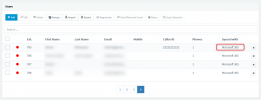
One last question, in the "Users" node, search for this extension that has been created. In the "Synced with" column, do you see Microsoft 365?
 
  • Like
Reactions: Evolute IT
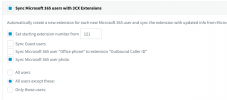
  • User sync, we have 'All except these users'.
  • Under 'Add users' this guest user does not appear in the list.
  • The user does not show anything in the 'Synced with'
 
The user does not show anything in the 'Synced with'
In this case, this means that most likely this user was at some point synced (maybe forgot momentarily to add to exclude list?), but then they were removed from the list in the Settings.
If they were still being synced, you would see this:
1632398191760.png

Long story short, by the time they aren't being synced not, just delete this extension and it should not be re-created again.
 
But how can this be?
  • 'Sync guest users' has at no point been enabled.
  • The user has at no point been anything but an Azure guest user
Also, why only this one user and not the 200+ other guest users?
 
But how can this be?
  • 'Sync guest users' has at no point been enabled.
  • The user has at no point been anything but an Azure guest user
This, I can't answer, I can only tell you the only situation under which this could have happened.
The other possible scenario is that in fact, this 3CX extension was created manually from within 3CX, so someone purposely put the email there.

The fact is, whenever an extension is created as a result of syncing with MS365, there is a flag that shows the "Synced with" column to "Microsoft 365".
If you removed the user from the O365 Settings, that flag is also removed from the extension.
 
As the only 3CX admin, I can promise you it wasn't created manually + The chance of me randomly creating a user account that happens to have the email address of a client with whom I'm in no way connected or aware of... is pretty remote. There must be a log somewhere to show what was created when/how?

Edit> Also to confirm, there is no way they could have been 'accidentally' added as a standard Azure user in o365 and then switched to a guest as their email is an external domain.
 
To get a real idea what happened, the logging level would have had to be set to Verbose at the time the initial sync happened.
Also, it would have to have happened in the last couple of days, because these logs roll over.

If you check the above 2 checkboxes, check the 3cxSystemService.log and 3cxManagementConsole.log files on the server.

If not, then I suggest just deleting the extension and check to see if it ever comes back.
 
Looks like we have another issue today, this time a shared mailbox has appeared in the users list.
  • Definitely wasn't there on Friday
  • We have dozens of shared mailboxes, only this one has sync'd
  • Doesn't appear in the All users except these 'Add users' list
  • 'Synced with' is blank.
  • No first/last name under user information (only email address)
 
Looks like we have another issue today, this time a shared mailbox has appeared in the users list.
  • Definitely wasn't there on Friday
  • We have dozens of shared mailboxes, only this one has sync'd
  • Doesn't appear in the All users except these 'Add users' list
  • 'Synced with' is blank.
  • No first/last name under user information (only email address)
Just to clarify something, in your setup you have the "All Users" option selected under normal circumstances, and a Shared Mailbox was synced.

If you select "Only these users" and press the "Add Users" button, if you search for the Shared Mailbox does it appear in this list?
If it does, if you then go to the "Contact Sync" tab, enable the Shared Mailbox sync and select "Only these mailboxes", if you search there does it also appear?
 
Under 'User sync' we have 'All users except these' (screenshot below)Screenshot 2021-09-27 at 15.50.50.png
 
We have another Azure AD Guest account in the User list this morning. Again no first/last name, only an email address and the 'sync'd with' is blank. Think there is a bug here, time to take a closer look?
 
and another one, this time a Microsoft Teams channel group mailbox - and showing 'sync'd with' as being Office 365.
 
There does seem to be an issue here, should we not be having a direct conversation with support to seek a resolution?
 
and another one, this time a Microsoft Teams channel group mailbox - and showing 'sync'd with' as being Office 365.
Is this again showing in the Users list?

If you select "Only these users" and press the "Add Users" button, if you search for the Shared Mailbox does it appear in this list?
If it does, if you then go to the "Contact Sync" tab, enable the Shared Mailbox sync and select "Only these mailboxes", if you search there does it also appear?
Could you please clarify on this and let us know what happens?
 
Selecting 'Only these users', Add Users button - non of the three are in the list.

To confirm, we now have an Azure guest user, shared mailbox and MS Teams group mailbox showing in the list. Plus there were the original couple that we deleted on your initial advice (neither of which were the same Azure items as the current three).
 
Also, is it not an indication of a more serious issue if the 'Sync'd with' is blank...?
3CX-Phone-System-Management-Console.png
 
Also, is it not an indication of a more serious issue if the 'Sync'd with' is blank...?
Does deleting this "Blank" entries just has them come back later again with the "Sync'd" being blank?
 
No, when deleting incorrect users, either with or without a sync status of 'Office 365', they do not come back. Each reported instance to date has been a different Guest/Shared account.
 
I'll PM you for more information on this matter.
 
Status
Not open for further replies.