Solved Microsoft 365 Guest User synchronized

Status
Not open for further replies.

paulsummers

Customer
Basic Certified
Joined
Feb 18, 2019
Messages
68
Reaction score
6
Have an issue with an unexpected 3CX user account being created from an Azure guest user profile.
  • 'Sync Guest Users' is and always has been disabled.
  • Only one of the hundreds of external guest users has synchronised.
  • Microsoft confirms the guest user is created correctly and with no difference to our other guest users.
  • Azure AD admin shows the user type correctly set as 'Guest'.
  • The 3CX user extension shows only an email - no first/last name has synchronised.
  • Guest users are created programmatically by MS when accessing an External File Share Sharepoint site - so no scope for human error.

 
Just to confirm we have had the exact same issue on one of our clients installs. One of my engineers was added as a guest user on a SharePoint site and it has sync'd them into the extension list. However this hasn't placed a first or last name, it's only placed the email address in the extension and hasn't flagged the SyncedWith column.

Checking the user list manually they don't exist to add the exception too either.

1633451890594.png

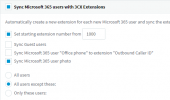
Sync settings are as follows:
1633451954181.png
 
Just to confirm we have had the exact same issue on one of our clients installs. One of my engineers was added as a guest user on a SharePoint site and it has sync'd them into the extension list. However this hasn't placed a first or last name, it's only placed the email address in the extension and hasn't flagged the SyncedWith column.

Checking the user list manually they don't exist to add the exception too either.

View attachment 24879

Sync settings are as follows:
View attachment 24880
Could you try and replicate this for us? I tried playing around with the SharePoint users, added some guest users, but the same didn't happen in my case.

If you could try the following it would be great:
  1. Enable Verbose logging in 3CX from Dashboard --> Activity Log --> Settings
  2. Add a new users to the SharePoint site exactly like you did with the Engineer
  3. Check in "Users" if the user appeared and if they did, generate the SupportInfo
  4. Download the file from the admin email address and send it to me in a PM (you'll need to upload to something like GDrive, Dropbox, WeTransfer, etc). Also please tell me the email address of this user so it's easier to find the log entries.
 
Thanks Nick - we've tried to replicate the issue but it doesn't seem to be a common thing, very random. As you can imagine we can't enable Verbose logging until it happens again as it could be some time.

I'll try and re-create the problem and pop you over the logs.
 
  • Like
Reactions: NickD_3CX
OK so can now confirm, every new guest user and shared mailbox is being created as an extension, despite 'Sync Guest Users' being unticked.
 
Just an update to this thread, we have identified the root cause of why Guest Users and Shared Mailboxes are being created randomly as Users.

There will be a fix for this in V18 Update 2.

Important Note:
Due to the way the MS365 API returns the information, Shared Mailboxes must not have a First Name or Last Name configured.
Also, normal users must have at least a First Name or Last Name.
 
Status
Not open for further replies.