Migrate Extensions to different account

Status
Not open for further replies.

greatchoice

Silver Partner
Basic Certified
Joined
Sep 21, 2020
Messages
265
Reaction score
13
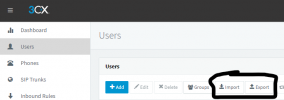
Is there any type of export or migration feature? We have a site with 20 phones that we need to separate from a 3CX server.
 
1637276784095.png
 
Yea i know about that but it just puts the extensions in the new system. You still have to resync that up to the SBC again and reset the phones.
 
What do you mean separate from 3cx server, please provide more inform on what you are trying to do ?
 
  • Like
Reactions: ChrisC_3CX
Sounds like OP has a site that needs its own phone system (sale?). I don't think there's a shortcut... Install a new SBC connected to the new 3CX server, factory reset the phones, and attach to the extension on the new server. The phones usually have a way to do that on the phone, or one can do it via the phone's web GUI with the password in the current 3CX server. The export/import would at least get the extensions/users set up.
 
If you are indeed moving to a new 3CX Server avoiding to factory reset the phones is not possible.

The following steps would be required:
1. Export the required extensions from the current server.
2. install the 3CX SBC on the new site and configure it to the new server.
3. Factory the IP Phones while connected to the same LAN as the new 3CX SBC.
4. Detect the phones in the "Management Console >> Phones" section of the new 3CX Server.
5. Assign them each to their corresponding extension.

Note: Bear in mind that exporting an extension that has IP Phones assigned to it will create a csv file that only holds the first IP Phone in the extension's list.
 
Status
Not open for further replies.

Forum statistics

Threads
111,975
Messages
590,084
Members
164,901
Latest member
Silent_Guru