Solved Migrate On-Prem to Cloud - Restore from backup error

Status
Not open for further replies.

Tomass

Customer
Joined
Feb 24, 2022
Messages
3
Reaction score
1
Hey all.
Migrating a service from on-prem to cloud hosted. Completed a backup inc licence key and FQDN.
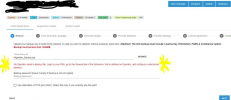
Just in the process of installing the cloud instance from our portal, uploaded the backup and I get an error
"No Operator email in backup file. Login to your PBX, go to the General Tab of the Extension that is defined as Operator, and configure a valid email address"
Now... the on-prem NUC running the 3CX service has been shutdown already however I do have a screen grab of the operator account and it does in-fact have an email address configured.
What now!!!
1645689955334.png
 
I would try extracting your backup file and opening the XML file.

Do a CTRL + F to find "Operator"

it will say:

Code:
            <Description>Operator extension number</Description>
            <Name>OPERATOR</Name>
            <Type>String</Type>
            <Value>107</Value>

Now do a search for
Code:
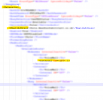
<Internal DN="107"

and look for it under the <Extension> heading.

Ensure that you have something in the <EmailAddress> file for this extension.

1645691781233.png

ZIP it back up and try a restore.
 
Yes I did that, and there is indeed a valid email address in there. I also attempted to change it, zip it all up again, and then it says invalid format. grrr
 
Yes I did that, and there is indeed a valid email address in there. I also attempted to change it, zip it all up again, and then it says invalid format. grrr
Did you check there wasnt a space?
 
First off, I do have to mention that you should never try accessing the backup file and modifying it. Should you need to do this for any reason, you should first always copy the original backup file and only fiddle with the copy to avoid possibly corrupting the original.

That said, have you tried editing the file directly from within the archive without extracting the whole thing?
 
This issue has been resolved. The error was not due to the extension 100 - Operator not having an email address, but rather that the 3CX General settings were set to use ext 101 and the operator and that extention did not have an email address. This was fixed by setting 100 as the default operator.


Thank you all for your time and suggestions :-)
 
  • Like
Reactions: NickD_3CX
Glad to hear this!

I'll set this one to 'Solved', but before I do I just want to re-iterate that we don't recommend editing backup files because this could cause them to not be restorable.

If you run into similar issues, it's best if the original 3CX system you took the backup from still exists, to make any changes needed there, then take a new backup.
 
Status
Not open for further replies.

Forum statistics

Threads
111,974
Messages
590,081
Members
164,899
Latest member
mazet