


- Joined
- Jul 16, 2021
- Messages
- 23
- Reaction score
- 7
HI All.
I have had a on-premises install and im migrating to Azure as I get free credits. (I tried to post in Self hosted) but said You need a Self-hosted system to post in this section.)
I took a backup of my current onpremises install.
Shutdown my on prem server
Deployed via Azure Marketplace
Restored the backup. All seemed to go well.
We dont use physical phones, we only use the iOS and Android apps.
So my current issues are:
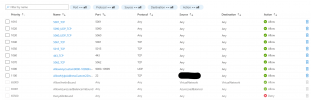
I cant access the Managment console or webclient via FQDN or IP. I can ping the FQDN and resolves to the Azure IP. The sip services have registered and can call in and get the IVR and Call out too. It just hangs on loading if i try to go to Team, Contact, Recents, Chat or voicemail. Keypad loads and i can dial out. I can SSH and ran a sudo service 3CX* status and can see all services running. Anyone got any ideas i could try?
I have had a on-premises install and im migrating to Azure as I get free credits. (I tried to post in Self hosted) but said You need a Self-hosted system to post in this section.)
I took a backup of my current onpremises install.
Shutdown my on prem server
Deployed via Azure Marketplace
Restored the backup. All seemed to go well.
We dont use physical phones, we only use the iOS and Android apps.
So my current issues are:
I cant access the Managment console or webclient via FQDN or IP. I can ping the FQDN and resolves to the Azure IP. The sip services have registered and can call in and get the IVR and Call out too. It just hangs on loading if i try to go to Team, Contact, Recents, Chat or voicemail. Keypad loads and i can dial out. I can SSH and ran a sudo service 3CX* status and can see all services running. Anyone got any ideas i could try?


