Migrate to Different SBC?

ZL-User

SOHO User
Joined
Apr 2, 2025
Messages
4
Reaction score
0
I have a question / issue.

I have a setup with some Fanvil X7A and yealink phones, connected via a (virtual) SBC hosted on the local LAN. This works great.
Now i need to migrate from this SBC to a new one, as we also will be migrating from Hypervisor and a different internal IP range.

My idea was to just deploy a new SBC on the new hypervisor (done and works great), arrange the firewall rules so that communication is allowed between the phone IP range and the new SBC.
And then i just change in the admin console/Users/IP Phone and change the routing device and save it.

3CX shows the new SBC under admin console/phones for that number.
But if i check the phone itself, on the admin web interface, the proxy Proxy Server Address still shows the old IP.

I did a force reboot, reprovision from 3CX, reprovision form the phone admin console.
Phone is also working fine, for making and receiving phone calls (on the old SBC). So communicating is fine.

I just can't figure out why it will not update my SBC configuration.

Does somebody have any idea or help where to troubleshoot from here?
 
Sounds correct, are your sure the phones are reprovisioned? Normaly the new config with the new sbc should be pushed to the phone and at the latest after a reboot the phone should use the new sbc.
 
That was indeed also my guess, of how it works.

I'm trying to trace why it does not do it. But i can't figure it out yet.
 
The phones should be in the same network as the sbc.
 
I am not sure right now, but we never had any problems with sbc in the same network.
 
Is the really a hard requirement? As it would explain it.

This is literally in the first paragraph of the guide. In case there is any doubt, yes the SBC must be on the same exact LAN as the phones, otherwise it's not of much use.

I have also done the migration many times and it's always successful. Keep in mind, the SBC must already be up and running (green) before you do this, that's pretty much the only prerequisite. Was it already online?
 
  • Like
Reactions: bitn2
This is literally in the first paragraph of the guide. In case there is any doubt, yes the SBC must be on the same exact LAN as the phones, otherwise it's not of much use.
Sorry, but on that part of the documentation I don't agree on.

The 3CX Session Border Controller (SBC) is a software service that installs in your local network to allow easy connection of IP Phones to a 3CX instance in the cloud or a remote on premise 3CX

If i would make this statement, i would consider my private network as a local network, but that is not the same definition as in the same VLAN or IP range;
I would read this this as local fast network (like my home, or within a company), probably without any firewall/NAT specific configurations.
But that does not mean the same IP range what is my case.

I would read this really differently. If its really needs to be in the same IP range as the phones, i think the text needs to be more clear on that part. As a local network, can be multiple IP ranges/VLAN.

But i traced the issue, so that is not a real hard requirement.

Not sure why this was the case, but could be because it looks like my old SBC (V18.1.36) is a pretty old version, or its just bad luck.

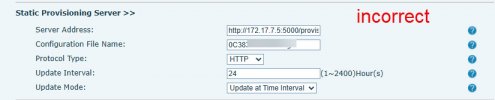
The provision server on the phone, was pointing to the SBC server, and not 3CX Admin Interface. All maybe this is also a good supported configuration. I'm not sure on that.

PBX-Incorrect.jpg
It showed the old SBC IP, on what I'm not correct on that configuration. I'm not even sure if something listen on http on TCP 5000.

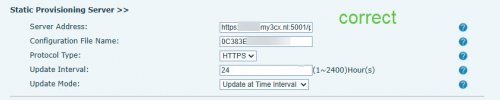
If I checked the new configured phone, i can see that the server is the 3CX cloud instance. What would also make more sense to me on an architecture level.

You want the phone to download the configuration from the server, as this is always the same, but the proxy that is needed for the voice traffic, would needs to pass by the 3CX SBC router.

PBX-Correct.jpg

After i changed the static provision server server address, and changed in 3CX admin interface the SBC router, the phone pickup the change and works correctly.

So this was the issue.
 
That's strange indeed, the SBC does not provide provisioning files so not sure how you ended up with that URL. Maybe you used DHCP Option 66 or you migrated the PBX you had previously, and gave SBC the same IP address?

Also you need the V20 SBC to get quality reports. This is a V20 feature so please upgrade you SBC if you haven't already
https://www.3cx.com/blog/news/sbc-eol-upgrade/
 

Members Online Now

No members online now.

Forum statistics

Threads
111,843
Messages
589,327
Members
164,679
Latest member
SamadMYK