- Joined
- Sep 18, 2024
- Messages
- 67
- Reaction score
- 16
Hi Team,
I was wondering if it’s possible to adjust the missed call display so that we only see the caller's name and phone number.
Currently, we’re seeing the entire call flow, including ring groups, the RG names, and other details. In some cases, we also see a [V] added, followed by the caller’s name, the group or groups it came from, and then the phone number (see image below).
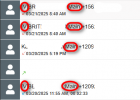
Is it possible to only see the original source (Name and phone)?, if so, where can we edit this in order to have this result?.
Thanks again for all your kind support.
Sincerely,
Anthony R.
I was wondering if it’s possible to adjust the missed call display so that we only see the caller's name and phone number.
Currently, we’re seeing the entire call flow, including ring groups, the RG names, and other details. In some cases, we also see a [V] added, followed by the caller’s name, the group or groups it came from, and then the phone number (see image below).
Is it possible to only see the original source (Name and phone)?, if so, where can we edit this in order to have this result?.
Thanks again for all your kind support.
Sincerely,
Anthony R.