Missing Admin icons in webclient

Status
Not open for further replies.

Trilotech

Customer
Joined
Dec 9, 2022
Messages
6
Reaction score
0
Hello everyone!

I am new here and just installed 3cx this morning. I am trying to follow the docs but I do not have the icons the docs indicate I should have...
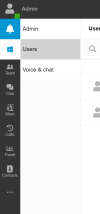
Under the "Admin" section of the webclient I only have "Users" and "Voice & Chat". I have no other options like "Groups", "Office Hours", etc.
I gave myself all rights in the management console.

Why is mine different? Anyone know?

Thanks in advance!!
 

Attachments

  • Screenshot 2022-12-09 111427.png
    Screenshot 2022-12-09 111427.png
    18.9 KB · Views: 34
Are you running u5 or u6?
 
I do not know. Sorry! How do I find out? I downloaded the Windows version on the website this morning.
 
Are you running u5 or u6?
Some other user, but u5 doesn't even have an Admin section in the webclient.
You can't even give an System Owner Role or System Admin in u5.

But im not an help, since i don't have even an idea why he doesn't see the other options if he gave himself the role.
Here for me it's working flawless with u6, i can see all the categories.
Maybe that helps a little.

Cheers
 
Some other user, but u5 doesn't even have an Admin section in the webclient.
You can't even give an System Owner Role or System Admin in u5.

But im not an help, since i don't have even an idea why he doesn't see the other options if he gave himself the role.
Here for me it's working flawless with u6, i can see all the categories.
Maybe that helps a little.

Cheers
You absolutely can see admin exactly as the OP describes in U5. Just the 2 options they mention.

Turn it on by checking the box under the extension labelled:
System Administration (Can administer the phone system and add certain system admin features to the Web Client)
 
  • Like
Reactions: Ramalama
You absolutely can see admin exactly as the OP describes in U5. Just the 2 options they mention.

Turn it on by checking the box under the extension labelled:
System Administration (Can administer the phone system and add certain system admin features to the Web Client)
You are absolutely correct, sorry didn't seen that checkboxes.

But yes, under U5 i have:
Admin / Users / Voice & chat

Under U6 i have Goups / Office Hours / etc additionally...

Seems for me like it should be @Trilotech
U6 is Alpha, so wait a little then you get those additional Sections.

Thx @SweetAction
 
Thanks everyone! It seems I am on U5. I don't want to do U6 yet. Why are all the docs for U6 Alpha??? Are there docs for u5?
 
We are glad that you managed to locate the rights under the extension to enable admin access.

Regarding your question about u5 admin guides these can be found here:https://www.3cx.com/docs/manual-u5/
 
Status
Not open for further replies.

Members Online Now

Forum statistics

Threads
111,831
Messages
589,277
Members
164,660
Latest member
RJenkinsROCK