- Joined
- Jun 17, 2021
- Messages
- 43
- Reaction score
- 2
Looking into MS admin to remove the app from the 365 side, but I cannot find it. Where would I go?Try restarting the hosted instance, otherwise delete the app from 365 side and set it up again.
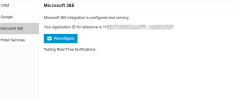
You can use the reconfigure button under the M365 integration option to simply reconfigure the integration with a new app registration but also ensure all that the options are checked when you connect it, and then also check the option for Consent on behalf of your organization, then press Accept after you enter the 365 global admin account details to log in.Looking into MS admin to remove the app from the 365 side, but I cannot find it. Where would I go?

yeap, did all that. still, no login with MS option is showingYou can use the reconfigure button under the M365 integration option to simply reconfigure the integration with a new app registration but also ensure all that the options are checked when you connect it, and then also check the option for Consent on behalf of your organization, then press Accept after you enter the 365 global admin account details to log in.
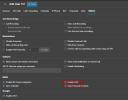
Additionally, check the user's options tab for the option below.
View attachment 39517
found it! In the users tab, it looked like MS 365 was enabled, but it was not. Weird way to show a greyed (blued?) check box. Enabled it again and it's showing now.yeap, did all that. still, no login with MS option is showing![]()
Founded in 2005, when VoIP was an emerging technology, 3CX has gone on to establish itself as a global leader in business communications.