Missing video

Status
Not open for further replies.

Lakes

Free User
Joined
Oct 8, 2019
Messages
36
Reaction score
6
We have an issue on WebMeetings which are a mixture of participants, some without a web cam. There is space onscreen for 4 video participants but I seem to see callers in the order they dialled in. The first two may have cameras and I see them, then I just see a placeholder with part of our logo if the next two callers have no camera. Caller 5 has a camera but I don't see them at all but others on the call can.
Part way through the call, caller 5 pops into view.
Firewall checks all pass.
Audio is fine throughout the conference.

16.04.504 On premise running on Windows 10 with firewall off and no AV.
 
I worked this out, the users with no webcams need to have them turned off, this allows other cameras to be seen. I kind of assumed this would be automatic and that there would be more than four windows, is four the limit? (Firefox and Chrome)
 
  • Like
Reactions: JohnS_3CX
Sounds like you were hitting the maximum videos limit, good idea though.

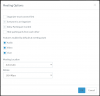
We will see if this can be done automatically, but for now you can schedule your meeting with the option of "Video" under "Features enabled by default" unticked:

1585830957715.png
 
Thanks, that's useful information I hadn't investigated those options. We had 5 people on the conference and only 3 with cameras, what's the "maximum videos limit"?
 
It's currently at 25 video streams, in some regions or MCUs it may be less until they are also upgraded.

We are currently working on deploying more servers around the globe to cover all needs.
 
I doubt we hit that, I think it's just understanding the screen and the cameras, on Chrome can you see more than 4 video participants?
 
Status
Not open for further replies.

Forum statistics

Threads
111,973
Messages
590,078
Members
164,896
Latest member
sameage