MMS Image file extension missing

Status
Not open for further replies.

TopKick

Customer
Joined
Oct 14, 2021
Messages
2
Reaction score
0
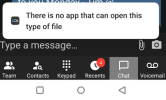
I've notice that in the 3CX cell phone app and the 3CX Desktop app that when you download the incoming MMS image it does not have a file extension and hence the device does not know how to open the file. We are using Flowroute for our service provider using v3. Is this a bug with the 3CX system or a configuration issue? If I add the .jpg file extension windows can open the file just fine.

We are running on-premise version 18.0 (Build 965).
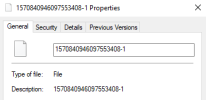
1663591314178.png1663591346290.png
 
Please note that we have identified the issue and we will fix it in the next update. We need to change the field we read the file extension from to resolve the issue.
Thank you for reporting.
 
  • Like
Reactions: nopoi
Just installed update 7. Now Inbound mms messages are broken and not received. Outbound mms works fine.
Any suggestions?
 
Just installed update 7. Now Inbound mms messages are broken and not received. Outbound mms works fine.
Any suggestions?
Just tested and we can receive MMS fine through Flowroute on update 7. Have you tried different senders to confirm its not a sender issue?
 
Where are you seeing the "messaging -> settings -> general"? I don't see those in the SIP trunk config and there aren't specific messaging settings anymore that I can find after the 18.6 upgrade. Or does this need to be done with the MMS provider?
This is within Twilio and not within 3CX.
 
Just tested and we can receive MMS fine through Flowroute on update 7. Have you tried different senders to confirm its not a sender issue?
MMS is working this morning and the file extensions are in place. Thank you
 
MMS is working this morning and the file extensions are in place. Thank you
Glad to see its working for you now. Thank you for the update
 
Status
Not open for further replies.

Latest Posts

Forum statistics

Threads
111,973
Messages
590,075
Members
164,895
Latest member
jasonkkrause