Mobile App - log out if not in use

timbo343

Premier Customer
Joined
Mar 15, 2025
Messages
18
Reaction score
3
We're in the process to start using 3CX and i'm trialing the app on my personal mobile phone with the view to give our employees the option to install the App on to their's so they can use their own phone with their work extension.

Now i've got the app installed, is there a way to log out of the app when not in use or is it a case of having rhe app running all thr time in thr background, whish for us is not ideal.

We were using the LG Erricson IPECS systen and although the mobile app was okay, we could at least sign out of the app so it would not disturb.

Is this a thing with the 3CX app?

Thanks
 
With 3CX, you have a few options for this.
1. Use DND with a schedule, so it autoswitches between Available and DND.
2. Use different statuses where you disable Push for one of them.
2. Disable the account in the app (go to the menu, then Accounts, use the checkbox to activate/deactivate the account.)
 
With 3CX, you have a few options for this.
1. Use DND with a schedule, so it autoswitches between Available and DND.
2. Use different statuses where you disable Push for one of them.
2. Disable the account in the app (go to the menu, then Accounts, use the checkbox to activate/deactivate the account.)
Thanks, is the schduler built into the app? I thought it was u der Schedule but that's for scheduling meetings.

I've found the DND options to forward to VoiceMails when DND is active.

The other scenario is that a user has a deskphone and has the app on their mobile. Is there a way to set the mobile app to be inactive so they just use the deskphone? I guess the only way to do this is to disable the account in the app? Shame 3CX haven't got an easier way to maange this like "log out".

I dont see an option to activate / deactivate the account.
 
Last edited:
The scheduler is the auto-switch in the 3CX. You can have it switch between Available and DND on a schedule.

You can also use the Available and Available 2 to handle the in-office (no mobile app) vs out of office. Simply uncheck "Accept Push Notifications" from the status in their forwarding rules.

And the option to deactivate the account is in the mobile app's menu under Accounts. It's the checkbox. I said so already.
 
Cheers. I see that Schedule is in the client on desktops webapp but not in the mobile phone app.

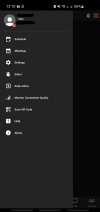
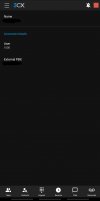
I've had another look for the active / deactivate toggle but as shown below it's not there in the android app (blanked out the name and external PBX domain). I can see the tick box in the desktop app by clicking on the person icon and putting a tick in the box to activate the account.

This is what i see in the mobile app on android:

Screenshot_20250315_121038_3CX.jpg

Screenshot_20250315_121102_3CX.jpg
 
On Android it may be in Settings > Accounts. I am not familiar with it.

FYI schedule is server-side, so even the mobile switches status. It's all automatic and synced. But the only config is in the Webclient and the Admin section.
 
This is what i see in the mobile app on android:
First image (after clicking on the hamburger symbol), tap on the account at the top, then the account management opens, tap a little longer on the active account, deactivate it.
 
First image (after clicking on the hamburger symbol), tap on the account at the top, then the account management opens, tap a little longer on the active account, deactivate it.
Oh thank you!!
 

Latest Posts

Forum statistics

Threads
111,964
Messages
590,007
Members
164,870
Latest member
nizammoktar