Modified Call Flow ends call

overtech_nc

Bronze Partner
Advanced Certified
Joined
May 4, 2023
Messages
30
Reaction score
9
Hi everyone,

I'm having a weird issue with a Call Flow on which I only changed hours and audios.

When I apply it instead of the old one, the call is "ended by the script", according to the logs.


The previous call flow is as follows :


General View

r/3CX - General View
Old Office Hours, sends to extension 800

r/3CX - Old Office Hours, sends to extension 800


Old middle condition plays a message on tuesday afternoons, doesn't send to voicemail

r/3CX - Old middle condition plays a message on tuesday afternoons, doesn't send to voicemail


Old out of Office Hours, plays a message, doesn't send to voicemail

r/3CX - Old out of Office Hours, plays a message, doesn't send to voicemail


Here is what changed in the new CFD :
New office hours, sends to extension 800


r/3CX - New office hours, sends to extension 800


New tuesday afternoon hours, plays a message, doesn't send to voicemail (I'm keeping this instead of including it into the OoO hours because the voice message is different)

r/3CX - New tuesday afternoon hours, plays a message, doesn't send to voicemail (I'm keeping this instead of including it into the OoO hours because the voice message is different)


New out of office hours, plays a message, doesn't send to voicemail

r/3CX - New out of office hours, plays a message, doesn't send to voicemail


I kept the old CFD so I could revert back if needed. I simply "saved as" to a new project and modified what was needed, then built the zip.


I uploaded it in the "Integration - Call Scripts" section of the PBX, removed the "when this DID is called" condition from the old one so I could place it on the new one, then went to the Trunk and pointed to this new CFD in the "default route" section, instead of the old.

When the new CFD is up, call is rejected instantly. When I revert back to the old one, everything's fine.

I don't see what I did wrong, but maybe someone with a fresh perspective will see it!

Thanks a lot in advance for your help and happy new year
 
I don't see what I did wrong, but maybe someone with a fresh perspective will see it!
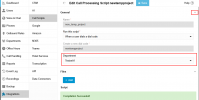
I suspect that the script was not assigned to any department.
1767857142754.png
 
I suspect that the script was not assigned to any department.
View attachment 50584

It is assigned to the same department as the previous CFD, I double checked this when I struggled to find where to change the condition about the DID, as the General section is not visible by default
 
Set the 3CX log level to verbose. This way you'll be able to see which CFD app components are processed, when they are processed and where the program might be stuck. If needed you can also add additional CFD logger blocks.
We're missing your CFD project for analysis.
 
Last edited:
@overtech_nc
I had assumed it - but just to be sure the question:
Is the current CFD Builder v20.2.84.0 being used to build the app?
I just want to make sure that the previous program wasn't created with an older version of the CFD Builder and that later manual adjustments were made in the 3CX C# code.
 
Set the 3CX log level to verbose. This way you'll be able to see which CFD app components are processed, when they are processed and where the program might be stuck. If needed you can also add additional CFD logger blocks.
We're missing your CFD project for analysis.
Just did that, then called first with the new CFD, then with the old one, just to compare...and daaaaaaaaaaaaaamn there's a LOT to read! Can't even do a search, as I don't know what to look for...
 
Can't even do a search, as I don't know what to look for
Each individual block in the process is listed there, sometimes even with its parameters. I there are queries they are also listed. This should be used for troubleshooting. Just follow the planned process and the actual flow via the log to see if it's running as it should.
Otherwise as mentioned earlier: temporarily insert additional CFD Logger components blocks and write specific outputs to the log.

Just to be sure: you're looking in the 3CXCallFlow.log?
 
@overtech_nc
I had assumed it - but just to be sure the question:
Is the current CFD Builder v20.2.84.0 being used to build the app?
I just want to make sure that the previous program wasn't created with an older version of the CFD Builder and that later manual adjustments were made in the 3CX C# code.
Oh...that's a great question! Version is 18.5.8.0 and when I check for updates, there's none...but maybe this version can't upgrade to 20?
 
Each individual block in the process is listed there, sometimes even with its parameters. I there are queries they are also listed. This should be used for troubleshooting. Just follow the planned process and the actual flow via the log to see if it's running as it should.
Otherwise as mentioned earlier: temporarily insert additional CFD Logger components blocks and write specific outputs to the log.
I'll check what those CFD Logger components blocks are and give it a go if I don't find another solution
 
I don't know if it has anything to do with all this, but I just saw that the new CFD doesn't have .Main in its name in the Call Scripts section, like the other one. I've done nothing different than with the previous one regarding building, so I don't know why it's not there...
 
Oh...that's a great question! Version is 18.5.8.0 and when I check for updates, there's none...but maybe this version can't upgrade to 20?
DAMN
Good thing I asked again.
Then the generated program definitely can't work as it should. In CFD v18 there was no handling of department times. The C# code had to - and was probably - manually adjusted later in 3CX.
https://downloads-global.3cx.com/downloads/3CXCallFlowDesigner20.exe or your customer portal

I don't know if it has anything to do with all this, but I just saw that the new CFD doesn't have .Main in its name in the Call Scripts section, like the other one
right
 
Yes, but if you don't regularly check the forums, you miss it unfortunately, and even without that, the app should prompt about an available upgrade when opened.

Just installed it, this time the extension is mandatory, so I specified it, and when I want to upload, I get this red error message "Number: Value already in use".

I'm wondering if it means I'm gonna have to remove the other CFD?
 
I'm wondering if it means I'm gonna have to remove the other CFD?
Yes, that - or get a new number. The C# code of the old CFD can be saved beforehand.

Normally, such a question doesn’t come up again later. But it could be related to the name change from the v18 to the v20 app - I don’t even remember anymore.
 
I removed the previous script and same error "Number: Value already in use"...

No calls can come in anymore, as there is no script available and it doesn't even work when I change the trunk's default route to the extension itself...
 
Wow...now that's a problem. I used an extension number that is not used at all (700) and it says it's already in use...

At least I'm gonna find a way to make call go through without the CFD working, for starters...then check what that's all about.

[EDIT] Even if I route Trunk calls to a user, I get a voice message saying the line is busy...
 

Members Online Now

Forum statistics

Threads
111,842
Messages
589,320
Members
164,677
Latest member
skander