module of zoho CRM to sync contacts of 3CX

Status
Not open for further replies.

HiroNikuyama

Bronze Partner
Joined
Jul 20, 2020
Messages
77
Reaction score
7
Hi Thank you for your support.
Now, this is a question about the integration of 3CX with zoho CRM.

Does contacts of 3CX always sync with contacts of the 'contacts' module of zoho CRM?
It does not sync with contacts of the 'leads' module which also deals with telephone numbers in zoho CRM.?

Best regards
 
It means all the number should be input in the Phone Number field, so that it will sync in 3cx Contacts? I'm Right
The synchronization happens when you receive a call from an external number, or you make a call to an external number. In this case, 3CX will search for the external number in all the phone fields in the CRM. If found, the contact will be added to 3CX Contacts, and the agent using the Web Client or the Desktop App will have a popup with the contact record.
 
  • Like
Reactions: Psalms
The synchronization happens when you receive a call from an external number, or you make a call to an external number. In this case, 3CX will search for the external number in all the phone fields in the CRM. If found, the contact will be added to 3CX Contacts, and the agent using the Web Client or the Desktop App will have a popup with the contact record.
Got it, no matter where is the phone number located in the field.

How about in Call Journaling, I already enable but I can't see it reports External calls?
 
Got it, no matter where is the phone number located in the field.
Correct, any phone field can be a match.

How about in Call Journaling, I already enable but I can't see it reports External calls?
Zoho requires that you create a custom field to store the agent's extension number, and you need to configure this custom field ID in 3CX, so 3CX knows how to match an extension number to an agent. Did you do this?
 
Correct, any phone field can be a match.


Zoho requires that you create a custom field to store the agent's extension number, and you need to configure this custom field ID in 3CX, so 3CX knows how to match an extension number to an agent. Did you do this?
Yes I did this. But still I can't see the reports External calls in Zoho?
 
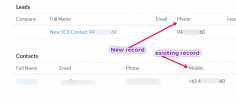
Hi, I hope someone can assist me - Ever since I changed over to the Windows App I have been having issues - it is not matching to the correct record. It will only work with the field 'phone' and not 'mobile'.
Sure, the mobile prefix is +61 but it was working pre windows version.
 

Attachments

  • 3cx-matching-issue.png
    3cx-matching-issue.png
    42.9 KB · Views: 7
Correct, any phone field can be a match.


Zoho requires that you create a custom field to store the agent's extension number, and you need to configure this custom field ID in 3CX, so 3CX knows how to match an extension number to an agent. Did you do this?
Hey @edossantos, I did this, however the External calls can't find it in Zoho. What should I do? Thanks
 
Hi, I hope someone can assist me - Ever since I changed over to the Windows App I have been having issues - it is not matching to the correct record. It will only work with the field 'phone' and not 'mobile'.
Sure, the mobile prefix is +61 but it was working pre windows version.
Zoho requires an exact match. You should store your numbers in E164 format, and ensure that your SIP Trunk gives you the number in that format as well, or apply Caller ID Reformatting to get the number in E164 format.
 
Hey @edossantos, I did this, however the External calls can't find it in Zoho. What should I do? Thanks
Please, enable verbose logs from the 3CX Console > Dashboard > Activity Log > Settings. Then make a test call to reproduce the issue, and check the 3cxSystemService.log file that you can download from the 3CX Console > Dashboard > Activity Log > Logs button > Instance folder. There you will see any error causing that Call Journaling is not working.
 
Please, enable verbose logs from the 3CX Console > Dashboard > Activity Log > Settings. Then make a test call to reproduce the issue, and check the 3cxSystemService.log file that you can download from the 3CX Console > Dashboard > Activity Log > Logs button > Instance folder. There you will see any error causing that Call Journaling is not working.
Done with this also. I can't see an error when I downloaded the 3cxsystem.... How can I check if it's working well?
 
Done with this also. I can't see an error when I downloaded the 3cxsystem.... How can I check if it's working well?
The log will show the request sent to get the agent's extension, and the response received back. In some cases you will see an error, in other you might see an empty response from the server, which means that 3CX can't map the extension number to a Zoho agent...
 
Sorry what do you mean? I don't see an error in Logs. I don't know how to check the calls are logged as CRM Records? In my understanding, correct me if I'm wrong. If I made a call with existing contacts in CRM, I can see the Call logs through the CRM filed? Is that right?
 
Sorry what do you mean? I don't see an error in Logs. I don't know how to check the calls are logged as CRM Records? In my understanding, correct me if I'm wrong. If I made a call with existing contacts in CRM, I can see the Call logs through the CRM filed? Is that right?
Please enable verbose logs, make a test call, and then send me the 3cxSystemService.log file in a private message. Please do not post it here as it might have sensitive information.

Assuming everything is properly configured, when you make a call to a CRM contact, or receive a call from a CRM contact, if the contact is matched (you see the contact name and card in the Web Client), when the call ends, 3CX will add a call record in the CRM, associated to the contact and the agent that handled the call.
 
Assuming everything is properly configured, when you make a call to a CRM contact, or receive a call from a CRM contact, if the contact is matched (you see the contact name and card in the Web Client), when the call ends, 3CX will add a call record in the CRM, associated to the contact and the agent that handled the call.
You mean, 3cx will add call record in CRM if the contact is not exist or it's a different method?
 
You mean, 3cx will add call record in CRM if the contact is not exist or it's a different method?
If the contact can't be found in the CRM, 3CX can automatically create one for you, and populate the caller's number. If that's the case, 3CX will end up with a matched contact.

For the case in which there is no matched contact, 3CX will NOT report the call in the CRM. Calls are only reported when both the contact and the agent can be identified. This is why it's important that not only you have a matched contact, but also that 3CX can map the agent's extension number to a Zoho user. This requires that you populate the extensions of your Zoho users in the custom field you need to create in Zoho.
 
This is why it's important that not only you have a matched contact, but also that 3CX can map the agent's extension number to a Zoho user. This requires that you populate the extensions of your Zoho users in the custom field you need to create in Zoho.
When I check on the log my extension number is identified and also the Zoho user. But I don't know to check the logs in Zoho.
 
When I check on the log my extension number is identified and also the Zoho user. But I don't know to check the logs in Zoho.
Calls are seen as activities for the contact, for example this is from my testing installation:
1632408662536.png
 
  • Like
Reactions: Psalms
You can select if you want to create Contacts or Leads, but not accounts:
View attachment 24461


Hi, some zoho user has created an original tab like Contact, and they want this tab to pop up when receiving a call, how can make it possible?
 
Hi, some zoho user has created an original tab like Contact, and they want this tab to pop up when receiving a call, how can make it possible?
Custom CRM integration template.
 
Hi, some zoho user has created an original tab like Contact, and they want this tab to pop up when receiving a call, how can make it possible?
You would need to provide a ContactUrl pointing to this tab. Probably this is not possible.... If you can identify an URL like this, then you would need to edit the template to return that as the ContactUrl.
 
  • Like
Reactions: Evolute IT
You would need to provide a ContactUrl pointing to this tab. Probably this is not possible.... If you can identify an URL like this, then you would need to edit the template to return that as the ContactUrl.
Thank you.
May I know where I can find the details regarding CRM integration template and how to configure, impliment it?
 
Status
Not open for further replies.