- Joined
- Jun 2, 2015
- Messages
- 65
- Reaction score
- 6
Good morning, afternoon, evening, night.
I have a client that currently has a Debian based 3CX deployment running on premise using the default ports (https on 5001 for example).
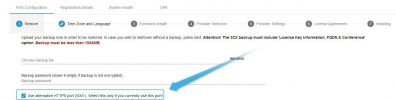
I need to move this instance to an AWS Lightsail instance. I've only deployed new instances in the cloud before, and not migrated an existing configuration and every instance I've deployed in AWS Ligthsail has had a management port of 443. Is there anyway that I can backup the config, and restore the config in the new AWS Lightsail instance and keep the current port details? eg management / webclient on port 5001 not 443?
Thanks in advance!
I have a client that currently has a Debian based 3CX deployment running on premise using the default ports (https on 5001 for example).
I need to move this instance to an AWS Lightsail instance. I've only deployed new instances in the cloud before, and not migrated an existing configuration and every instance I've deployed in AWS Ligthsail has had a management port of 443. Is there anyway that I can backup the config, and restore the config in the new AWS Lightsail instance and keep the current port details? eg management / webclient on port 5001 not 443?
Thanks in advance!