Moving from Windows to Linux Can I use the config

Status
Not open for further replies.
On VM problems, i've no knowledge, so impossible for me to help you.

For your old backup from 2014, do you know which 3cx version it was done with, perhaps if it's a version i have always windows exe sources i can send you the file to restore your backup on same old 3CX and almost you can check what your outbound rules were at this time.

3CX release i have start in 12.5 to 16
Thank you. Sadly I do not know. I could try, again to recreate it in another VM, but I asked the question at the start, how do I know which version as there is nothing I can see that informs the user in the app.

I'll give it a go, if you think it worthwhile. I suspect it's circa v5ish......
 
i can send you links to DL V12.5 and V14 and you run it on a windows machine and try with your file.
 
  • Like
Reactions: Jonners
We used them at a High Street bank and the world's largest police force.
(facepalm)

Well, you have a nice un-supportable scenario here, so ill sum this up in one last post, and not make another reply here.

1. Is the gateway you cannot make work on the same lan as the 3CX server, or is it having to cross the firewall to talk to 3CX, if so, there is your problem, firewall checker isnt a suggestion, if it is showing errors, there are config problems in the firewall. You have failures for full cone nat, meaning your ports are getting randomized in transit across the firewall. If the gateway is on the same internal network, 3cx should in its logs, or even on the dashboard be indicating that it refused calls coming from the gateway, if there are no such logs, then the calls are not reaching the 3cx server....

2. If you are using Debian from an install source other than the 3CX ISO, you are up a creek configuration wise, i have done such installs before the ISO came out, they are difficult, and if you are not well skilled at command line on linux, you honestly have no business doing such, as this is not for the faint of heart. The 3CX ISO contains a lot of pre-configuration or things such as Debian's built in firewall, and other services, so that they work properly with the 3CX PBX software. You could be fighting one of these internal services not being configured properly, and you wouldn't even know it, and its not something that is easy to just tell you, hey go type this and do that.

3. If you are not able to get the 3CX ISO to work properly i question what VM platform your using because we have lit them up on vmware player, vmware workstation, vmware vcenter, virtual box, etc, and had little if any issues, HyperV is a dirty form of virtualization, it can be made to work however, i believe you have to force Gen 1 or it goes into the weeds.

I wouldn't be surprised if the 3CX VM itself you have built up is not functioning correctly, which is leading to some of this. The only recommendation i could offer up that would be rather simple to test is to first figure out if you installed UFW, or IPtables onto the VM as part of your install and if so, lookup the commands to fully disable them, and then try again, if it works better, then you lack the config for those systems, which as i said, is included in the ISO installer along with lots of other stuff....
 
Don't use Draytek , so no experience, you give us your open ports surely on Firewall side but do you need also to add NAT rules to forward outside traffic to good Private IP ?
perhaps it's why nothing is good in firewall checker

MMMM OK. I think that's what it is doing, please see attached.
All WAN to 3CX Static IP have x open ports. Only query is items 9 and 10 as they overlap. Would it be better to make the TCP/UDP 9000 to 9398 and then UDP from 9398 to 10998????
 

Attachments

  • WAN to LAN Ports.jpg
    WAN to LAN Ports.jpg
    177.5 KB · Views: 6
i can send you links to DL V12.5 and V14 and you run it on a windows machine and try with your file.
OK, thank you.
 
(facepalm)

Well, you have a nice un-supportable scenario here, so ill sum this up in one last post, and not make another reply here.

I am not sure how to reply to the questions if there is no reply. Maybe someone else can.

(facepalm)
1. Is the gateway you cannot make work on the same lan as the 3CX server, or is it having to cross the firewall to talk to 3CX, if so, there is your problem, firewall checker isnt a suggestion, if it is showing errors, there are config problems in the firewall. You have failures for full cone nat, meaning your ports are getting randomized in transit across the firewall. If the gateway is on the same internal network, 3cx should in its logs, or even on the dashboard be indicating that it refused calls coming from the gateway, if there are no such logs, then the calls are not reaching the 3cx server....

This is one I answered back when, they both sit on the same box inside the FW, so do not cross it.
Last point, no not being seen, but that could be how the Linksys/Cisco is talking to the 3CX. They appear registered, but not date and time stamped. I had this issue when I first installed 3CX about 8/9 years ago, and can not for the life of me recall how it was resolved.

(facepalm)
2. If you are using Debian from an install source other than the 3CX ISO, you are up a creek configuration wise, i have done such installs before the ISO came out, they are difficult, and if you are not well skilled at command line on linux, you honestly have no business doing such, as this is not for the faint of heart. The 3CX ISO contains a lot of pre-configuration or things such as Debian's built in firewall, and other services, so that they work properly with the 3CX PBX software. You could be fighting one of these internal services not being configured properly, and you wouldn't even know it, and its not something that is easy to just tell you, hey go type this and do that.

I followed the official process for non 3CX ISO. As long as it is Debian.
https://www.3cx.com/docs/manual/installing-debian-linux-pbx/

It works if I use the FXO/FXS of the Draytek, but NOT the 2 x Linksys FXO/FXS units.

(facepalm)
3. If you are not able to get the 3CX ISO to work properly i question what VM platform your using because we have lit them up on vmware player, vmware workstation, vmware vcenter, virtual box, etc, and had little if any issues, HyperV is a dirty form of virtualization, it can be made to work however, i believe you have to force Gen 1 or it goes into the weeds.
It took about 3 goes, using VirtualBox on a xfce (Debian) host. When I did get it working it was cmd line and not being an engineer, I can't work with that. It also, after rebooting wouldn't load the 3CX, which I have seen a number of cases of. I have only had this once on the Debian base OS, and it rectified itself straight away.

It is using *.vdi and I can't say about Gen 1......

(facepalm)
I wouldn't be surprised if the 3CX VM itself you have built up is not functioning correctly, which is leading to some of this. The only recommendation i could offer up that would be rather simple to test is to first figure out if you installed UFW, or IPtables onto the VM as part of your install and if so, lookup the commands to fully disable them, and then try again, if it works better, then you lack the config for those systems, which as i said, is included in the ISO installer along with lots of other stuff....

The host has both installed and the virtual machine had the IPtables, but not the ufw. I have installed the ifw.
I'll look up the cmds to config them, maybe someone can assist.
 
disabling the firewalls is the easiest way to test if they are the cause, when disabled, all traffic is allowed.
 
disabling the firewalls is the easiest way to test if they are the cause, when disabled, all traffic is allowed.
Cheers.
Interestingly, there is a whole section on Draytek firewall settings on the 3CX support, so I took a gander and played about. Was much the same as I had and I ran the tests, same results, bar one less red.

I also ran an external test and got warnings that ports were closed, yet should be open. I am wondering if my ISP has something to do with this. I say that because (Sky) have blocked things before that they say are for my benefit, but actually prevent me from using other services, such as alternative PSTN. I need to do more digging. I'll also call Draytek. I just don't want to change too many things and knowing them they'll start by insisting on a FW upgrade, and that will add more problems... The Draytek FXS/FXO connects and works fine, that's what I don't get. ANyway.

I'll also think about your suggestion, to try turning off the FW altogether.

Thank you for your patience and support.
 
Interesting if frustrating day.
I am leaning towards the port theory.

I have double checked and tidied up the Draytek tables (and have a service call out with them, just waiting for them to get back) and updated the FW whilst at it. I then used "you get signal" to run tests and it said all the ports were open, except the range 9000~10998 (not that I tested the full range).

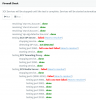
I then tested the 3CX Firewall tester and it came back with errors on all ports.

I then looked up about the Debian FW tools and changes, and learned that the ittables is being discontinued in Debian and everything is moving to nftables. I also learned and action turning off gfw, which I did and ran the 3CX test again. This time 5090 and 9002 upwards passed, BUT 5060 and 9000 didn't, which contradicts the remote tests.

So both tests only agreed on port 9000 and 5090

I am going to see what Draytek say about the ports, but suspect the only area they may be able to assist will be ports 9000 to 10998

The 3CX test on ports 5060 and 9000 will, I am sure come from the hosted Debian firewall.

The thing that confuses me most is that the sip trunks are all registered and working, so the SIP providers are getting through the FW and registered and able to pass traffic. The Soft phones too, even my smart phone via both LAN and Tunnel. The FXS/FXO on the Draytek router are also registered, BUT the two Linksys FXO/FXS whilst they say they are registered, and they appear in the SIP Trunks as green, the 3CX system is seeing them as failed to register and calls are NOT coming in. Firewall or is this something to do with a config?
 
You need to specify what type of port failure it is, closed, or remapped, or whatnot.

Also, just because you see "Registered" does not mean all is well, the audio traffic uses different ports, so you can have the signaling working on port 5060, and still have all kinds of issues. VoIP uses numerous ports, and all must be working.
 
Thanks BrenttG
Appreciate the support

You need to specify what type of port failure it is, closed, or remapped, or whatnot.
I have attached a screen shot called "5060 & 9000 port fail 3CX". It shows "full cone test failed". I have looked at the "How to resolve?" but it looses me.

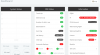
Also, after the test, and I noticed this yesterday, I am NOW getting Dashboard errors coming up and warnings. Never happened before. And I can't log in (after I go to look at status of services the screen hangs, when I refresh I have to log in again, in case you were wondering). I am wondering is everything is starting up after the tests. I have tried to look in to the services, but it is empty. Screen shots attached "after test errors" and "why suddenly all the red". Any thoughts. Only fixes after an OS restart.


Also, just because you see "Registered" does not mean all is well, the audio traffic uses different ports, so you can have the signaling working on port 5060, and still have all kinds of issues. VoIP uses numerous ports, and all must be working.

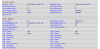
Yes, I am getting that. Note screenshot of SIP Trunks, "Register" and "LinksysFXO FXS Register". This is making me think that this could actually be a config between the two, issue. Something needs to be set in the Linksys and or 3CX to make them work together, rather than the ports, though they now clearly need sorting. What do you think?

The interesting thing is the difference between what the external tests by the tool is saying and the 3CX tests. Why and how could they be different?

I have turned off all FW and port forwarding rules on both the host machine and the 3CX hosted. I found that I couldn't access files on the host, though I can now, I am a tad concerned that I have opened up too much as, as an example I didn't want any access from the 3CX hosted to anything bar a couple of backup and config files folders on the host, and that, since playing with these ports seems to be either all or nothing.

Thanks for your support, help and insights.
 

Attachments

  • LinksysFXO FXS Register.png
    LinksysFXO FXS Register.png
    42.9 KB · Views: 3
  • after test errors.png
    after test errors.png
    61.7 KB · Views: 5
  • 5060 & 9000 port fail 3CX fwtest.png
    5060 & 9000 port fail 3CX fwtest.png
    72.8 KB · Views: 7
  • Why suddenly all the red.png
    Why suddenly all the red.png
    37.8 KB · Views: 7
  • Register.png
    Register.png
    47.2 KB · Views: 4
Small update. Have been searching and tampering with the Linksys settings. Still not working for OUTBOUND calls and the registration in 3CX still shows green button, but no details in the registration table, BUT it is now working for INBOUND CALLS.... Calls are coming in and being picked up by the 3CX and dealt with. That said:

One line, "HOME" which goes straight into an IVR (I know the wife will kill me over it :-D ) has 3CX message "Line busy please try later".

Is this message alert of any use? Device 07770xxxxxx dialed on (AnyLine@VOIP Discount) had no available outgoing trunk(s) for Call(from "200"<sip:[email protected]>;tag=4215076074 to 07770xxxx)

PS: The fix was to ADD the the 3CX IP address to the outbound proxy. Not sure why that should work, but it did.

Outbound calls (with the service provider lines turned off, so it is forced to use the Linksys) I got a message "Called number does not exist" on both lines. I then realised that the FXO and FXS are provided as separate devices and so different registrations on the same IP, but different port 5060 and 5062. So I created a duplicate SIP Trunk with a port of 5062, entered the new registration on the Linksys and tried again. This time the 3CX is passing the call to the Linksys, the line goes quiet, no ringtone and then the call ends after a few seconds without connecting, just 3 x beeps. However, after this the inbound stopped working, the 3CX states "the number you are trying to reach is busy, please try later".

Regardless I do think I am on to something here and I feel this is about a config somewhere.

So, breaking down my problems:
  1. Inbound giving a "line busy" message and not routing - why and solution.
  2. Outbound not completing.
  3. The 5060 and 9000 port errors.
I think I am getting there.
 
Last edited:
For the port errors please try to bypass your firewall completely and see if this goes away.

You might have to enable DMZ mode for the PBX IP in your modem. If it still persists it may be a good idea to ask your provider in case those ports are already reserved in their modem provisioning and if so, whether they can disable them or change them to something that won't affect you
 
Seems the outbound the number is being changed or not recognised, as one line it times out, no tones and the other it gets a message from the service provider stating the number is not recognised. Settings are identical and worked for nearly 10 years so it must be new requirements of this version of 3CX, so somewhere a config needs changing. Any ideas, please?
 
OK, so now I have either outbound or incoming calls via the Linksys working, by creating two profiles for each device, one on port 5060 and the other on port 5062 and then changing the PSTN Line registration settings to the new SIP Trunk extension, registration details and ensuring the Dial Plan 8 is updated to the new trunk extension, in my case for one it is (S0:10005) and the other (S0:10001).

Noting NOT to forget to update the outbound and inbound rules in the 3CX.

So, noting the information above I still have 3 problems to resolve, with some help.
  1. I can only have in bound or outbound calls via the Linksys.
  2. I still have the 5060 and 9000 port errors.
  3. And nearly forgot, why after running the 3CX Firewall test I have to reboot the OS.
Sorry, JohnS,
Just after I posted my update I saw your reply in answer to my port query.

For the port errors please try to bypass your firewall completely and see if this goes away.

You might have to enable DMZ mode for the PBX IP in your modem. If it still persists it may be a good idea to ask your provider in case those ports are already reserved in their modem provisioning and if so, whether they can disable them or change them to something that won't affect you
That occurred to me, that Sky may have something to do with it. I am still awaiting Draytek to get back first. I'd like their input and to check their bits. After that I'll have a call with Sky, probably middle of next week earliest as I can't do anything now and we have people over from this PM into next week, plus Draytek time. I'll keep you posted. Hopefully someone will have some other ideas in the mean time.

Thank you JohnS
 
Last edited:
OK, so now Linksys all in and outbound calls are working.

So just looking at points 2 and 3.

YIPEEEEEEE :p Not as simple as the older versions, but I got there. Thank you all.
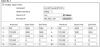
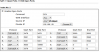
 
The full cone nat failure is the firewall/router, it is translating your traffic on those ports to random numbers, full cone nat is also known as "consistent nat" on some firewalls such as sonicwall, or static port on pfsense/opnsense, a lot of lower end firewalls only support dynamic nat(dynamic port), and even some high end firewalls do this by default, but it makes a mess out of voip traffic and needs to be disabled for the ports 3CX uses for SIP and Audio.

I googled around for how to do that on a draytek, but i found nothing, its as if they dont have this feature.
 
The full cone nat failure is the firewall/router, it is translating your traffic on those ports to random numbers, full cone nat is also known as "consistent nat" on some firewalls such as sonicwall, or static port on pfsense/opnsense, a lot of lower end firewalls only support dynamic nat(dynamic port), and even some high end firewalls do this by default, but it makes a mess out of voip traffic and needs to be disabled for the ports 3CX uses for SIP and Audio.

I googled around for how to do that on a draytek, but i found nothing, its as if they dont have this feature.
Thanks for that. I have sent to Draytek. I have someone now looking in to this. I have given him remote access. Lets see what he comes back with. I have had them rewrite their FW on the back of stuff I have asked for so lets see what they do here.
 
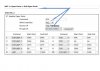
What's the exact model of Draytek 2860 you are running? This is my 2860n+ port forwarding (note I have deliberately reduced the RTP port range before I get jumped on...!)

10420
 
Last edited:
What's the exact model of Draytek 2860 you are running? This is my 2860n+ port forwarding (note I have deliberately reduced the RTP port range before I get jumped on...!)

View attachment 10420


That's interesting, Cjay,
Thank you.
Mine is a 2860Vn+
Noted differences are:
5060 you have as UDP, I have UDP/TCP
3478 you have as UDP and I have TCP and I also have 3479
5001 you have TCP/UDP I have TCP

According to:
https://www.3cx.com/docs/manual/firewall-router-configuration/
5060 should be UDP, so to secure up a bit I'll change that, though it shouldn't stop access.
3478/3479 there is nothing about this one for Stun other than that is the port range, and mine seems to work, but as I assume so does yours I shall change to UDP/TCP so covers both. It MIGHT explain some of the errors.
5001 and 443 are for HTTPS and web conferencing and state TCP, so I shall keep mine as is. As it is working and it is more secure, plus seen some articals where it is just TCP.

Thank you. Useful.
 

Attachments

  • OPen Ports.png
    OPen Ports.png
    35.3 KB · Views: 3
Status
Not open for further replies.

Forum statistics

Threads
111,923
Messages
589,752
Members
164,796
Latest member
Dame24