Moving from Windows to Linux Can I use the config

Status
Not open for further replies.
Noted on the port forwarding, we all have our own unique configs. I was more interested in the 'V' part of your 2860. I used to have an earlier Draytek router with voice capability and this wouldn't co-exist with 3CX unless I completely disabled its internal voice functions (it intercepted port 5060). I noticed in an earlier post you mentioned that the Draytek FXS/FXO ports were registering. Not sure if this is an issue or not...?
 
Noted on the port forwarding, we all have our own unique configs.
Yup, agree, but it is still good to get a starting point. Much appreciated.

I was more interested in the 'V' part of your 2860. I used to have an earlier Draytek router with voice capability and this wouldn't co-exist with 3CX unless I completely disabled its internal voice functions (it intercepted port 5060).
I still have my old 2820 which works great, though now i only use it as a LAN switch and Wi-Fi access. The only reason I switch was because I had two Broadband connections, one with Sky and one Virgin Media, and the old 2820 couldn't cope with the Sky config.

I noticed in an earlier post you mentioned that the Draytek FXS/FXO ports were registering. Not sure if this is an issue or not...?
No, no issue. Used them like this for many years. They are good for testing and plugging in a fax machine. Note all is working now, just a couple of tidy up problems that may or may not be an issue. I don't like red lights, so that the 3CX FW test shows an error on 5060 and 9000 then I want it fixed even if calls are working.... Note that the two phone ports and set up are FXO and FXS, so I am using them as extensions.... just as I do the Linksys. So your next obvious query will be then why buy the Linksys. I did think that at the time, but the Draytek can only support 1 x PSTN line in that config so I would have had to buy just one, but I thought it would be easier to manage and maintain if both lines were identically managed.

So just two points to close off

  1. 5060 and 9000 port errors when 3CX tests Firewall.
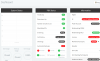
  2. Why after running the 3CX Firewall test I have to reboot the OS to get 3CX to work again. Attached is what I mean. And if I go into services it shows nothing even though it says they are running. I have to reboot the machine to restore service.
 

Attachments

  • Red after 3CX FW test and services stopped too.png
    Red after 3CX FW test and services stopped too.png
    74.1 KB · Views: 4
Last edited:
What Draytek firewall rules do you have active?
To which do you refer?

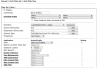
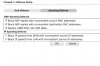
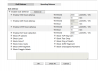
Please see attached. Is this what you were after?
 

Attachments

  • NetBios.png
    NetBios.png
    50.9 KB · Views: 8
  • Spoofing.png
    Spoofing.png
    21.4 KB · Views: 8
  • DoS.png
    DoS.png
    44.9 KB · Views: 8
Is this what you were after?
Yes - but as you don't have any port 5060/9000 rules then this shouldn't be a problem (I block all but my VoIP providers IPs on 5060 & 5001 which keeps the endless port probes at a safe distance, but firewall test fails unless I disable these rules).

You could try turning off DoS, I don't use it as it can have unforeseen consequences.

Maybe you can Wireshark your network to see what is really happening?
 
Yes - but as you don't have any port 5060/9000 rules then this shouldn't be a problem (I block all but my VoIP providers IPs on 5060 & 5001 which keeps the endless port probes at a safe distance, but firewall test fails unless I disable these rules).

You could try turning off DoS, I don't use it as it can have unforeseen consequences.

Maybe you can Wireshark your network to see what is really happening?
Thanks
What does your rule look like? Could I use it? It sounds like it would add some security...
Re Wireshark, except I would know what I was looking for. I am sure others have had this before and someone will come up with the solution.
 
What does your rule look like? Could I use it?
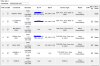
Sure. As per the pic what I'm doing is:
  1. Allowing port 5060 from VoipDiscount (they actually have a range of possible IP's - hence the subnet)
  2. Allow port 5060 from Localphone (they only use a single IP)
  3. Block all other traffic trying to hit port 5060 (there's a surprising amount in the Draytek log file!)
  4. Allow port 5001 traffic from the EE network so the 3CX Android app presence works correctly. Quite a big IP range for obvious reasons.
  5. Block all other 5001 traffic
  6. Is a Draytek default rule
10437
 
Please note that 3CX can utilize 5060 TCP and UDP, especially if you have remote phones, and some trunk providers....

As for having to reboot the box to get it back online, i think that is entirely something wrong with the OS itself not kicking the services back up properly, on our ISO installed systems we never have this issue.
 
Please note that 3CX can utilize 5060 TCP and UDP, especially if you have remote phones, and some trunk providers....

Thanks for this BrettG
I've put it back. :)


As for having to reboot the box to get it back online, i think that is entirely something wrong with the OS itself not kicking the services back up properly, on our ISO installed systems we never have this issue.

This only started recently. Worked fine than did all the changes as per blog and suddenly it started to play up. TBH I have not left it for a time to see if it self restores, only about 10 minutes or so. Note it also works fine if I restart or stop and start the services via the console, only the FW check fails.

########################################################

Sure. As per the pic what I'm doing is:
  1. Allowing port 5060 from VoipDiscount (they actually have a range of possible IP's - hence the subnet)
  2. Allow port 5060 from Localphone (they only use a single IP)
  3. Block all other traffic trying to hit port 5060 (there's a surprising amount in the Draytek log file!)
  4. Allow port 5001 traffic from the EE network so the 3CX Android app presence works correctly. Quite a big IP range for obvious reasons.
  5. Block all other 5001 traffic
  6. Is a Draytek default rule
View attachment 10437

Thanks Cjay
That's interesting. It's got my head buzzing. :-D In a good way.

Would be interested to see how the rule itself is built. Feel free to PM me the details.

I use VoiP Discount and VoIP Talk too. So I guess they'd be in the same rule. You've blanked out the IP addresses, is that because they are specific to your account and not public?

The local phones and devices, all have their own allocated IP address on my LAN or assigned.

5001 rules. Bit uncertain about that one. Surely the rule(s) is allowing all on EE access, but cutting out those on other networks, and if you have more than one, then it doesn't actually save a great deal????

Sorry, these might be stupid queries and questions.
 
Last edited:
You have to open up the ports under the "Open ports" or "Port Forwarding" page on the Draytek first.

You dont need to play in the firewall data filtering section unless you want to lock down access to the ports.
 
You have to open up the ports under the "Open ports" or "Port Forwarding" page on the Draytek first.

You dont need to play in the firewall data filtering section unless you want to lock down access to the ports.
Yes, thank you. All this was done some years ago.

The only issue I now have is that the 3CX Firewall test throws up an error on ports 5060 and 9000, but everything else works and tests to my firewall all work fine. It is JUST 3CX reporting.
 
If its working, its working, but 3CX's Firewall Checker is 99% of the time, Gospel.

But if its working then the issues must be very minor. Perhaps good enough...
 
If its working, its working, but 3CX's Firewall Checker is 99% of the time, Gospel.

But if its working then the issues must be very minor. Perhaps good enough...
I can go with that, and the restart after running the tests seems to have gone away. Maybe I just wasn't leaving it long enough.

I've also found I don't need top log in to the hosted OS for it to work, that's a bonus.

So i'm happy now. Thanks for the support and patience. I know I am a pain.
 
Status
Not open for further replies.

Forum statistics

Threads
111,923
Messages
589,752
Members
164,796
Latest member
Dame24