MS Access Integration

Status
Not open for further replies.

Jabba

New User
Joined
May 25, 2021
Messages
5
Reaction score
0
Hi. This is my first post and have no previous experience with 3CX, or using APIs etc. so go easy ;)

I have developed an Access 2016 database for a client which contains details about his clients and their orders. He has recently had 3CX installed, and he now wants to be able to automatically dial a customer number by clicking a button on the relevant Customer form. Can anyone advise how I would go about connecting to the 3CX system and sending it a dial request, providing the number from a field within the Access form - all using VBA? I've looked at various pages on the site discussing CRM / SQL Db interfacing, TAPI etc. but can't find any concrete information (that I understand!) to be able to implement this. Coupled with the fact that I do not reside at my client's desk, it is proving difficult to even experiment or follow steps provided in said site pages.

Any assistance would be very gratefully received.

Thanks
 
Unfortunately, MS Access is not a database type you'll be able to access (lol) from 3CX.

There is a TAPI integration with the Windows client but it has limitations.
 
  • Like
Reactions: edossantos
Thanks Frederick. Would you be able to shed some light on the TAPI integration, how to set it up and what it’s limitations are? All I’m after is making calls - not incoming or logging etc.
Thanks
 
It uses the 3CXPlugins: https://www.3cx.com/docs/installing-multi-line-tapi/

As for TAPI itself, it's a Microsoft protocol, so you'll need to look on Google how to use TAPI on Access. If that's even possible.

Otherwise, wait for the V18 Gateway service which will have a REST API. However, we have no dates on this.

There's also the "quick-dial URL" that was used in the old Click2Call Chrome extension. I suggest you download it, and see how it sends the phone number via the URL and just shows a dialer. It won't work with the browser extension tho.
 
If possible in the Access "View", add the tel:// in front of each number, and you should be able to make an Click to call try like this: tel://12345678
 
If possible in the Access "View", add the tel:// in front of each number, and you should be able to make an Click to call try like this: tel://12345678
Note that this would use the Windows client and not the Webclient however.
 
  • Like
Reactions: jed
Thanks both for your help. I believe my client has the Chrome extension for click2call - and I understand what you're saying about prefixing the phone number with "tel://", but how would I invoke the click2call from VBA and send it the URL address? Apologies if this seems a very basic question but, as I said, I'm not familiar with this and am in need of a bit of hand holding :)

I do appreciate your time and patience. Thanks
 
Thanks both for your help. I believe my client has the Chrome extension for click2call - and I understand what you're saying about prefixing the phone number with "tel://", but how would I invoke the click2call from VBA and send it the URL address? Apologies if this seems a very basic question but, as I said, I'm not familiar with this and am in need of a bit of hand holding :)

I do appreciate your time and patience. Thanks
The "tel://" is a protocol prefix that the 3CX Windows Client can use, just like many other telephony apps.

The Click2Call Chrome extension works with the Webclient by sending the number in the URL as a ?parameter. So the Webclient just shows a dialer with the number prefilled.

I suggest you try both and see which one you prefer.
 
Ok, so I've simply added an application.followhyperlink command in the Access form VBA, and the link I'm using is "tel://" & Replace([Phone Number], " ", ""). This does load the number into the windows 3cx client (which is what you expected), but when I click the call button the number just disappears from the display and nothing happens. Any ideas why?

If I want to go down the quick2call route using the same method as the web extension, what would the syntax be for the URL - "https://IP address/webclient/........."?

Thanks
 
Ok, so I've simply added an application.followhyperlink command in the Access form VBA, and the link I'm using is "tel://" & Replace([Phone Number], " ", ""). This does load the number into the windows 3cx client (which is what you expected), but when I click the call button the number just disappears from the display and nothing happens. Any ideas why?

If I want to go down the quick2call route using the same method as the web extension, what would the syntax be for the URL - "https://IP address/webclient/........."?

Thanks
The URL should not disappear this way.

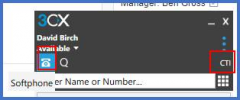
Let me know this: how is the Windows client configured? CTI or Softphone.

What's the format of the number when sent to the client?

As for Webclient, you'll need to download the Click2Call extension for Chrome and see how it sends the number via URL.
 
  • Like
Reactions: jed
It seems that it is setup so you can switch between Softphone and CTI:

1622104334722.png

The number is formatted with just the area code and number without spaces - no '+' or country code etc. e.g. 01234567890
 
It seems that it is setup so you can switch between Softphone and CTI:

View attachment 22193

The number is formatted with just the area code and number without spaces - no '+' or country code etc. e.g. 01234567890
If you dial it manually in the same format it works?
 
  • Like
Reactions: jed and Evolute IT
Status
Not open for further replies.

Latest Posts

Forum statistics

Threads
112,323
Messages
591,896
Members
165,474
Latest member
costionofrei