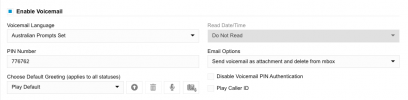
This is pretty trivial to workaround by editing the .xml in the backup or the .csv generated with a user export.
For existing users it's better to edit the .xml inside the backup, otherwise you'll end up resetting SIP auth IDs and passwords.
As always edit the .xml within the .zip file and save the .zip, do not attempt to extract the .xml, edit and re-zip as you will be unable to restore the backup.
Search for parameter <VMPlayMsgDateTime> for the extension(s) you want to change and edit as below:
<VMPlayMsgDateTime>None</VMPlayMsgDateTime> = Do Not Read
<VMPlayMsgDateTime>Play12Hr</VMPlayMsgDateTime> = Read in AM/PM Format
<VMPlayMsgDateTime>Play24Hr</VMPlayMsgDateTime> = Read in 24 Hour Format
Save the file within the .zip and restore the backup.
For new users it's easier and non-disruptive to create them in web admin, then export them and edit the extensions.csv file. Look for column 23, VMPlayMsgDateTime and set the value as below:
0 = Do Not Read
1 = Read in AM/PM Format
2 = Read in 24 Hour Format
Save the file. Delete the new users in web admin, then import the extensions.csv file to recreate the users with the desired Voicemail settings.