Multi-Tenant Setup issue

BCS Tech

Customer
Joined
Aug 21, 2014
Messages
84
Reaction score
10
I and trying to setup a Multi-Tenant instance.

First attempt, went to Digital Oceans and ran the app in the Market place to install a 3CX Droplet. Worked good. The initial setup using the DO wizard is for a 4SC Pro license. So I sent back into the 3CX account an upgrade the license to 16SC Pro. Expecting to see something that would allow me to change the configuration to Multi-Tenant. Not go.

So then I used the instructions at the link https://www.3cx.com/docs/multi-tenant-configuration/ and went back into the 3cx account and did the download and sekected Multi-Tenant and ran the install hosted at Digital Oceans, but after the instance was created, it again shows 4SC Pro License. Not the 16SC Pro I was expecting and the admin interface is the same in both instances. I went into the department setup expecting to see the additional setup line that ask for the extension numbers, but that was not there.

What did I do wrong? Can I go into the one that has the 16SC Pro license and change the MULTICOMPANYMODE in Parameters and make this a Multi-Tenant system?

Thanks
 
I don't think you're reading the documentation correctly.

You asked a similar question here: https://www.3cx.com/community/threads/multi-tenant.127867/

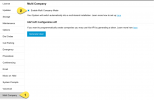
You either have not done the XML correctly or manually changed the Config under Advanced > Parameters

1732160298817.png

Once you have set this to 1, then you can see under System > Multi Company to enable

1732160356414.png

Hope this helps

Best
Lance
 
This is exactly what I was looking for. Thanks

In your reply, you said "I may not be reading this document correctly"
https://www.3cx.com/community/threads/multi-tenant.127867/"

I have read this document multiple times and do not see anything that references making changes in parameters and turning on MULTICOMPANYMODE. I read it as saying

Go to 3CX account
Go to Downloads
Install the "3CX Multi-tenant"
Select hosting
Once completed, the system is ready.

I did all of that and it is not ready. From your reply, I still have to go into Parameters and set the MULTICOMPANYMODE. If I missed this part in the document, please let me know where it is located.

Thanks for the info
 

BCS Tech,​

I am having this exact same issue here, I want to reinstall our Multi-Tennant 3cx, but each time I do it deploys as a non-Multi-Tennant. Nowhere in the documentation says that you can just set a parameter to turn it into Multi Mode
 

BCS Tech,​

I am having this exact same issue here, I want to reinstall our Multi-Tennant 3cx, but each time I do it deploys as a non-Multi-Tennant. Nowhere in the documentation says that you can just set a parameter to turn it into Multi Mode
Portal > Downloads > 3CX Multi-Tenant > Install.

It's the only way.
 

ConceptsWeb

And what happens if you have already deployed MCM so it doesn't show up in "Portal > Downloads > 3CX Multi-Tenant > Install."
And why can't we do "manually changed the Config under Advanced > Parameters" ?
 

ConceptsWeb

And what happens if you have already deployed MCM so it doesn't show up in "Portal > Downloads > 3CX Multi-Tenant > Install."
And why can't we do "manually changed the Config under Advanced > Parameters" ?
You can only use an unactivated license. Contact your account rep.

And because enabling MCM in an existing system is not recommended nor supported. Remains of previous setups could cause issues. The proper way is full from scratch using the setup file they provide.
 
"You can only use an unactivated license." - Yes, It was an un-activated licence but then we activated it in MCM. But we want to reinstall it on another box to increase the number of extension numbers.

Yeah, It's a new install, so there is no previous config. It looks like enabling MCM works.
All we need is the settings from the Setup File they provide e.g. MCM=1 and this would fix the problem.

I don't understand why 3cx are making this so difficult to reinstall a MCM instance.
 
Remains of previous setups could cause issues.
This.

When deploying a Multi-tenant, you would need to do a bit of planning on your end. For example how many customers would i want to deploy on my system?

How many users per tenant? How many system extensions.

Then you would give the necessary number of extension digits to the system to accommodate this.

Deploying from an unactivated subscription with the parameters in the setup config XML allows for any checks and balances to be done, and then deploy.
 

Latest Posts

Forum statistics

Threads
111,962
Messages
589,995
Members
164,867
Latest member
swegner