Multi-Tenant - Shared Parking Not Locked to Department

lancerichards

Platinum Partner
Advanced Certified
Joined
Aug 14, 2024
Messages
159
Reaction score
199
Hi Team

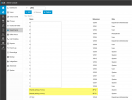
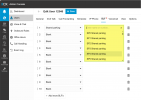
We have found that when we assign SPx to a Department, when assigning BLF Keys, you can still select ANY SPx not just the ones your Department is assigned

Screenshot Showing Department with 2 SP's assigned SP12 & SP13
1741903386349.png


Screenshot showing Logged in as a Department Administrator, I can select from ANY SPx not just the ones which are assigned to my Department
1741903454515.png


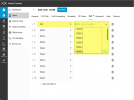
I believe it is beneficial to ensure that the assigned SP's are only for that department, just like a BLF Key can only be for the users of that department.

Screenshot showing that BLF is restricted to only users of a Department
1741903760837.png


I hope that's clear :)

Best
Lance
 
Great question @SteveITS
The only assigned parks are in the individual departments which is exactly how it is specified in the documentation.

In the DEFAULT Department, there are not SPx's, therefore, users should only see SPx's for the department which they are assigned to, which is not the case.

Best,
Lance
 
So it would seem that if the SP is assigned to another department already, then they cannot select it from the list, however, if it is not assigned to any department, then they are able to select it even it if it's not assigned to the department.

I would think that they should only ever be able to select those which are explicitly assigned to the department by the System Administrator.

Just seems like some of the front end display logic has been missed here which is hopefully an easy fix in the next update :)

Best,
Lance
 
Last edited:
Hi @lancerichards,

I might repeat what you've already said, but I was just curious about the issue you raised, so I replicated and tested it on my end.

Here’s what I observed:

Department 1: Assigned SP0–SP9
Department 2: Assigned SP10–SP15
Department 3: No assigned SPs

I then created an additional 10 unassigned SP slots via System > Call Parking. Which then leaves me with 25 SP Slots in total created.

When I log in as a user or receptionist under Department 2, I am unable to view Department 1’s shared parking slots, which is expected since Department 1’s SP roles are not assigned to Department 2 and vice versa.

However, I can still view all other unassigned SP slots across departments.

I believe this it is just fine tuning that needs to be done by the System Administrator or System owner, to configure only SP Slots as needed and not more than expected, which will then cancel out seeing unassigned SP's from any department, but I totally agree that specific roles assigned to users should not have visibility to see this, for incase unassigned SP slots are created.

Thanks
 
  • Like
Reactions: lancerichards
Thanks @NicholasP_3CX
This was already done :)

The concern was more around non-assigned SPx being shown to users which didn't have them assigned :)
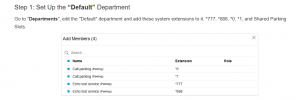
Thats the reason they should be assigned to the default department beforehand.

The system by default will make them available when they are created, so you have to puit them into the default department. Thats why in the manual we have it as step 1.
 

Latest Posts

Forum statistics

Threads
111,964
Messages
590,007
Members
164,870
Latest member
nizammoktar