Solved Multicast paging puts paging caller on hold

Status
Not open for further replies.

Mark Jones

Forum User
Intermediate Cert.
Joined
Oct 26, 2017
Messages
128
Reaction score
12
It would seem that the linked post is completely unrelated to what you are experiencing.

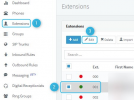
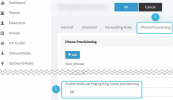
Based on the description of the issue you are facing, it is very likely that this uis happening due to the fact that the IP Phone you are making the call from (Caller) is also a member of that Multicast Paging group. Navigate to Extensions >> Edit >> Select the IP Phone making the call >> Scroll down and turn "Enable Multicast Paging Ring Group provisioning" Off. Reprovision the device from the "Phones" section and then make the same call again. Does the issue persists?
 
setting doesn't exist in version 16.0.9 however from the yealink gui i disable barge in and it works.
 
The setting I mentioned should exist if you have a "Multicast Paging Group" created under "Ring Groups". Based on the subject of your post, you are using Multicast Paging. Is this not the case?

The Yealink setting you mention does not sound like a setting related to this issue plus I would not recommend making manual configuration to the IP Phone as this would not only render the configuration unsupported but would also probably not be a permanent fix since 3CX provisioning may very well overwrite the changes.

In case I misunderstood, could you please clarify on what the issue is exactly and what relevant configuration currently exists on your 3CX Instance(Mutlicast Paging Group, Paging Group, etc)?
 
there is a multicast paging group but no option to add exts
 
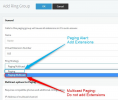
There is no option to add extensions to a Multicast Paging Group. As the name suggests, it sends the audio stream to a multicast IP address instead of making a call to specific extensions. Any IP Phones that are on the same subnet and are configured to listen to that Multicast IP, will receive and play the audio.

There are two types of Paging Groups:
1619099677752.png


If you are indeed using Multicast Paging, you will have to navigate to Extensions >> Edit >> Select caller IP Phone >> Scroll down and disable multicast for that device:

1619099949867.png


1619100214302.png
 
thanks for you help.
 
  • Like
Reactions: ChrisC_3CX
You're very welcome! Please feel free to post a new thread should you need additional assistance or information.
 
Status
Not open for further replies.

Forum statistics

Threads
111,974
Messages
590,081
Members
164,899
Latest member
mazet