Multiple 3CX Servers hanging at random since 16.0 Release

Status
Not open for further replies.

BrenttG

Platinum Partner
Advanced Certified
Joined
Nov 17, 2017
Messages
912
Reaction score
586
OK, ill break down the technical side of what we are seeing in our cloud environment of nearly 100 3CX Servers.

We have numerous 3CX servers this has occurred on now, there does not seem to be any warning...

  1. Customer will call us and report that they are not getting inbound calls, but can still call out.
  2. We enter the 3CX Management Console, and about 50% of the time everything looks green, the other half, the Services indicator will be Red.
  3. Upon entering the services list, we will see one of two possible things:
a: All services are running, however the SIP Server has 1.2-1.5 GB of RAM usage
b: IVR Service will be in Stopped state, and the SIP Server has 1.2-1.5 GB of RAM usage.

Our hypothesis is that the SIP Server is depleting the Server of RAM, which causes the IVR Service and/or another service to Halt or Exit to stopped state.

In troubleshooting, the IVR Service does not easily restart if we attempt to just do it, however if we restart the SIP Server which has high memory usage, and then do the IVR Service they both begin to respond normally again fairly quickly.

This has occurred on systems with only 6 phones, and a system that has ~45 phones, it does not seem to matter how many extensions are on the system. This has taken place exclusively on systems that were upgraded from 15.5 to 16.0, we have not seen it occur on systems that are new as of V16.0, but that does not mean it wont, it just has not yet.

All the affected PBXs were of the following specs, running on VMware vCenter/ESXi 6.5
2 x CPU Cores (Xeon E5 2640 v2s, Hosts are all dual socket)
2GB RAM
50 GB HDD
Debian 9 built from 3CX Linux ISO, No GUI Running or Installed, we use console exclusively to reduce resource usage.
No CPU throttling is in place
All VMware Hosts are ~25%-35% Memory Load, none are even close to being peaked.
Our hosts are all dual Socket Dell with 256 GB RAM per host.

All of our Linux 3CX Servers average 20-30% memory usage during normal operation, but when the problem occurs, the memory usage skyrockets, and it is the SIP Server, that is causing it.

I will add any further technical details as i learn of them or am notified of them from the rest of my team. We have encountered this 5-7 times now, and have just put together during a meeting that this same symptoms, and resolution and risen over and over now, but so far never on the same system more than once yet, we are going to start a tally to track the impact pattern. The first incident of this as best we can tell, was about 3 days ago.
 
Last edited:
Hello @BrenttG

I am sorry to see you are facing issues with V16. I would recommend (if you haven't already) creating a ticket with our support department so they can look into the issue with more detail. Without looking at the PBX logs we have no way of knowing what might be causing the memory usage spike which then kills the service.
 
We had the same problem, we found the problem with EXSI 6.5 was the issue, if you upgrade to 6.7 the problem will go away
https://serverfault.com/questions/859095/why-does-my-debian-server-freeze
This is completely irrelevant, and if this was our issue, we would have been seeing it since the debian 9 update, not just since pushing 3CX v16... You also did not read my whole post as i indicated, it isnt an OS hang/freeze, but rather the SIP Server has a memory hole, and causes the IVR to starve for memory after the SIP Server swallows all the available ram....
 
Ok, well Just thought I would help, we have not had any problems after 6.7 upgrade. Have lots of fun finding the root problem!
 
Ok, well Just thought I would help, we have not had any problems after 6.7 upgrade. Have lots of fun finding the root problem!

In the topic you linked, they reported, changing NICs to e1000, and/or using the dell customized vmware esxi 6.5 image solved the issue, well all of our servers are dells, running the dell customized 6.5 image since they were setup, and we have been using e1000 nics on all the debian 9 VMs since we started building them, so that thread is still not relevant to us, even in that regard.

Its a memory hole, and very random, next time it happens on a non-critical machine that we can spend some time looking deeper into, we will do a little digging, but the last few it has occurred on, we had to get back online ASAP, and did so before doing any form of deep dive...
 
has occured 2 more times since i last reported on this, and not on the same PBXs as before...
 
hi, i have the same kind of behavior since 16.0.1.273 upgrade...
on Debian 9 environnement also.
Hosting is made by OVH through PBX express installation.
issue definitely not tied to OS or hosting platform.
Nothing has changed since issue appeared but 3CX version...
 
I had similar issues when I was running the V16 on an VM / Instance with only 1GB Ram and no swap file / partition. Even the console was not accessible. Does your VMs have a swap-partition or swap-file?
 
Quick question, did you activate the "instance manager" function. In my case the apt-cache and salt-minion were hogging all the cpu power available making the container almost unresponsive.

I think this is an Saltstack problem, not a 3cx problem.
 
Our internal server, as well as 30 others hung Sunday night at 8:03 PM, coincidentally, we have the automatic updates enabled, and set to run at 8:00 PM. We have seen them hang after doing updates before, however in this instance,unless it was a small update that was not really listed, nothing updated on Sunday, or did it?

The fact that so many went offline at the same time, yet another 60ish remained fine.... And i must clarify, the OS did not freeze, however 3CX was non-functional. To reboot them one of our engineers who was on call just hopped in and did graceful reboots from their shell's since it happened during off hours. He however does not have the depth in Linux to go hunting for memory holes or stuck processes, he was more worried to just get them back online.

The interesting thing is, per the monitoring we have setup, we see them go offline at 8 PM to do updates, and are offline for about 2 minutes or so, then they come back online for a minute or two, and then they go offline flat until we rebooted them, so they do come back online, we see it, but then perhaps some cleanup process, or something that runs after the update causes them to go down.

The underlying Debian is still reachable and working via SSH when this happens.

To clarify some technical details:
All the 3CX Servers were built using the 3CX Debian 9 ISO
Firewall Checks are solid green, no errors or warnings
Linux GUI is not running or installed, we are all terminal junkies
They are all running on a VMware vSphere/ESXi 6.5 cluster
Identical Hardware settings(we deploy them from a template)
All in the same broadcast domain(10.x.x.0/24)
All are assigned 2 GB RAM, and 2+ CPUs

Cluster Specs:
4 x dell R720XD XL(26 bay) 2U Servers, each with:
|-256 GB RAM
|-2 x Intel(R) Xeon(R) CPU E5-2660 0 @ 2.20GHz (Total 16C/32T)
|-QLogic 57800 10 Gigabit Ethernet (Linked via SFP at 10Gbps to SFP Switch)
|-PERC H710P SAS-RAID Controller (1GB Cache) with 24 Bay Backplane + 2 Bay Rear Backplane
|-4 x 4TB Drives(Seagate Compute) in RAID 10 as a local datastore used for booting, and when the SAN is taken offline for maintenance we shift the VMs storage local, hasn't happened in a few months.
https://www.dell.com/support/home/uk/en/ukdhs1/product-support/servicetag/ccfsw52/configuration
CPU and RAM have been bumped up from listed on dells site

Dell Equallogic SAN Shared Storage
|-20 x 900 GB Drives split into 5 x RAID 10 Arrays
|-4 x 1 TB Drives in RAID 10
|-2 x Quad Port 1Gbps Controllers (8Gbps MAX throughput)

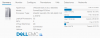
Below is an example of our heaviest loaded host, which isnt even breaking a sweat.
11035

During these incidents, Other VMs such as windows servers, and even other linux machines that are non-3CX have no issues, and are still running on the same hosts as the 3CX servers, so its not a hardware, cluster, or virtualization issue.
 
Last edited:
Quick question, did you activate the "instance manager" function. In my case the apt-cache and salt-minion were hogging all the cpu power available making the container almost unresponsive.

I think this is an Saltstack problem, not a 3cx problem.

Hello Gunnar

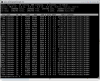
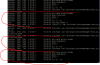
We are also having the same problem on multiple EXSi 6.7 hosted VM and the CPU is being hogged at 100% by the apt-cache processes. See the screenshots below:
11044
11045

How do you disable instance manager and stop this apt-cache? The only way we are temporarily getting round it is by kill all the processes off. But it comes back after a while.

Cheers
Az1104411045
 
@BrenttG How often is this happening?

I have a large install with 400+ extensions and was just starting to feel comfortable enough to upgrade to v16... This will likely keep us from doing so until 3CX can confirm a resolution to this issue.
 
@BrenttG

As my colleague suggested above, this is something that should be investigated via Support.

There's no way of knowing what the root cause is unless an investigation is made.
 
@BrenttG How often is this happening?

I have a large install with 400+ extensions and was just starting to feel comfortable enough to upgrade to v16... This will likely keep us from doing so until 3CX can confirm a resolution to this issue.
It is random, but seems to happen most frequently right after the automatic update runs, EVEN if there are no updates to be installed. You would think if there were no updates nothing would happen... But i suspect there is a cleanup task or "something" that runs whether there is an update or not.

@BrenttG

As my colleague suggested above, this is something that should be investigated via Support.

There's no way of knowing what the root cause is unless an investigation is made.
I will do so as soon as i get time, your support team seems to be pretty awsome, however i hope they dont insist on a wireshark capture before talking to me since that is kind of meaningless to this issue at least when getting started. ;)
 
Last edited:
  • Like
Reactions: pmterp
I stopped upgrading until later in the year, its not worth jeopardizing your business and or your clients especially if you use any custom templates.
 
Hello Gunnar

We are also having the same problem on multiple EXSi 6.7 hosted VM and the CPU is being hogged at 100% by the apt-cache processes. See the screenshots below:
View attachment 11044
View attachment 11045

How do you disable instance manager and stop this apt-cache? The only way we are temporarily getting round it is by kill all the processes off. But it comes back after a while.

Cheers
AzView attachment 11044View attachment 11045

First i just commented out the cron jobs for the instance manager
root@3cx026:~# crontab -u instancemanager -l
# Lines below here are managed by Salt, do not edit
# SALT_CRON_IDENTIFIER:Connector Cronjob
#15 * * * * /var/lib/3cxpbx/InstanceManager/instancemanager_cron > /dev/null 2>&1
# SALT_CRON_IDENTIFIER:ServiceCheck Cronjob
#5,15,25,35,45 * * * * /var/lib/3cxpbx/InstanceManager/service_check.sh > /dev/null 2>&1
# SALT_CRON_IDENTIFIER:Hibernation Cronjob
#*/1 * * * * /var/lib/3cxpbx/InstanceManager/hibernation.sh > /dev/null 2>&1

But the solution was just going through settings -> instance manager and just unselect "Allow remote management of this pbx"
11058

Hope this helps
 
It is random, but seems to happen most frequently right after the automatic update runs, EVEN if there are no updates to be installed. You would think if there were no updates nothing would happen... But i suspect there is a cleanup task or "something" that runs whether there is an update or not.


I will do so as soon as i get time, your support team seems to be pretty awsome, however i hope they dont insist on a wireshark capture before talking to me since that is kind of meaningless to this issue at least when getting started. ;)

Hi BrenttG

I think the Support Info file would be a good start, we would like to help resolve it
 
@Gunnar Brynjólfsson @Azhar

Can you both confirm if you are using the Instance Manager connected to a Reseller account on the affected machines ?
 
Status
Not open for further replies.

Forum statistics

Threads
112,089
Messages
590,697
Members
165,056
Latest member
PANAMERICANAGLOBAL