


- Joined
- Sep 16, 2022
- Messages
- 2
- Reaction score
- 0
Hi everyone,
I've having issues getting a new 3cx PBX setup using a multiple gateway setup. The PBX has access to two internet connections, one is a full internet connection, the other is a Optus SIP 5060 only connection to authenticate an IP based SIP Trunk.
The PBX is a windows machine, I've configured the device with two NIC's as below. I've also configured a static route for the for SIP Trunk, see below. As currently the PBX is sending and receiving SIP invites and calls are able to be made. However we get no audio either way and If the external number hangs up the call 3CX does not hang up the call.
Full Internet
IP: 192.168.1.5
Subnet: 255.255.255.0
Gateway: 192.168.1.1
SIP only
IP: 192.168.0.201
Subnet: 255.255.255.0
Gateway: No Gateway Set
Windows Static Route
Route ADD -p 123.102.25.0 MASK 255.255.255.0 192.168.0.200
I've done a packet capture and dug through the call, I'm not super skilled when it comes to Wireshark but I can see that 3CX is sending the RTP Audio over the SIP only Internet connection.
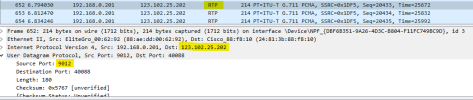
I've tried changing the Public IP in SIP VIA Header to the External IP of the Full internet connection and the "Contact" and "Connection" fields as well but nothing appears to work.
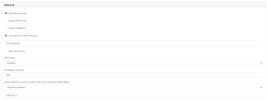
All ports are open on the full internet connection. I've attached the Packet Capture to this post.
Any suggestions are welcomed as I'm flat out of ideas.
Kind regards,
James
I've having issues getting a new 3cx PBX setup using a multiple gateway setup. The PBX has access to two internet connections, one is a full internet connection, the other is a Optus SIP 5060 only connection to authenticate an IP based SIP Trunk.
The PBX is a windows machine, I've configured the device with two NIC's as below. I've also configured a static route for the for SIP Trunk, see below. As currently the PBX is sending and receiving SIP invites and calls are able to be made. However we get no audio either way and If the external number hangs up the call 3CX does not hang up the call.
Full Internet
IP: 192.168.1.5
Subnet: 255.255.255.0
Gateway: 192.168.1.1
SIP only
IP: 192.168.0.201
Subnet: 255.255.255.0
Gateway: No Gateway Set
Windows Static Route
Route ADD -p 123.102.25.0 MASK 255.255.255.0 192.168.0.200
I've done a packet capture and dug through the call, I'm not super skilled when it comes to Wireshark but I can see that 3CX is sending the RTP Audio over the SIP only Internet connection.
I've tried changing the Public IP in SIP VIA Header to the External IP of the Full internet connection and the "Contact" and "Connection" fields as well but nothing appears to work.
All ports are open on the full internet connection. I've attached the Packet Capture to this post.
Any suggestions are welcomed as I'm flat out of ideas.
Kind regards,
James


