Multiple SIP Trunks on a Cisco 7945G.

Status
Not open for further replies.

Brodie Pike

Free User
Joined
Nov 13, 2020
Messages
14
Reaction score
2
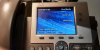
I have two Incoming/Outgoing lines on my system. There are both working but with my Cisco 7945G I want the two line buttons two show the two diffrent lines at the moment there both set to one of the Trunks what would be the proccess of this? IMG20201120162003-min.jpg
 
You will either need to use a custom template or remove the auto-provision and manually configure a second account, then tie that blf to the second account.
 
Well Im already using a Custom template giving the fact that 3CX dont "offically" support this phone. what would I have to change in the template?
 
Ultimately it depends on what 'show two different lines' means to you and what exactly you hope to gain.
 
Okay sorry for the vauge question. I'm trying to have Line 1 show the incoming and be the outgoing for one trunk while Line 2 is the incoming and outgoing for my 2nd trunk.
 
So just set your incoming rules for the 1st trunk to one extension and for the 2nd trunk to another extension. Set your outbound rules accordingly. And then add the second extension to the phone.
 
So I assuming you can provision two extensions to the same MAC address when doing it manually?
 
Yes. Otherwise I wouldn't have outlined how to do it
 
  • Like
Reactions: Brodie Pike
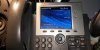
Well after abit I got it all work and now boths lines work seperate on the same phone! Thank you Cobaltit for the help!IMG20201120232021.jpg
 
Status
Not open for further replies.

Latest Posts

Forum statistics

Threads
111,990
Messages
590,163
Members
164,926
Latest member
tohoken1