Multiple SIP Trunks On One PBX

Status
Not open for further replies.

mweaver

Silver Partner
Advanced Certified
Joined
Mar 21, 2019
Messages
2
Reaction score
0
Hey Everyone,

We have about 4 Registration based SIP trunks on our PBX. Previously, the authentication type was IP based. We were having some dropped call issues so the VoIP provider suggested registration type for authentication.

We have prefixes in the outbound rules to specify which trunk to go out on for outbound caller ID reasons. The prefix works and it shows the outbound caller ID but all calls are showing as going over one trunk when running a call history report on the VoIP provider.

Any suggestions?
 
Hi @mweaver

Can you give more details, a screenshot from the management console perhaps showing exactly what report and what parameters you chose?
 
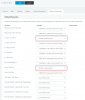
I have attached the outbound parameters for one SIP trunk. The report is not done in 3CX but in the web interface of the VoIP provider.

We have one outbound rule with prefix 274 and one outbound rule with prefix 668. Prefix 274 goes out over one trunk and prefix 668 goes over another trunk. It appears the calls goes out over the trunk because the caller ID for the trunk shows to the person receiving the call.

Let me know if you need any more information.

9908
 
When choosing a trunk to dial out from, the only way to see it in a capture would be through the AuthID which is unique for registration based trunks, but it don't see it here in your screenshot (like my example below)

9910

So in your case, to avoid changing any settings, I'm thinking it may be best to check via the BinLog viewer so you can see which trunk the outbound call actually went through based the virtual extension number of the trunk associated with the Call-ID in the log viewer (the call ID can be seen in a pcap).

Making a couple of calls, one from each trunk should reveal this for you. Obviously if you see the same virtual extension number then you will know that both calls left from the same trunk, but if you can see different virtual extension numbers (i.e one left via DN:10000 lets say, and one via DN:100001) then clearly it was not related to your PBX and might have something to do with the way the provider generates their reports. If I was not very clear, let me know and I will try to assist you.

Tip: If you search the virtual extension DN number in your trunks search box it reveals which trunk it belongs to

https://www.3cx.com/docs/3cx-log-viewer/
 
Last edited:
Status
Not open for further replies.

Forum statistics

Threads
111,916
Messages
589,722
Members
164,786
Latest member
supuni_rathnayake