- Joined
- Jan 9, 2021
- Messages
- 217
- Reaction score
- 42
Hello Everyone
First of all thanks for stopping by and giving time to this. i have a customer where they wanted two different companies under the same roof ,so i installed two SBC (raspberry pi4 s ) and setup two different instances (hosted by 3cx) and done. But now customer wants to have just one system under the same roof and my problem is that i have factory reset half of the phones (that was for different instance ((second company ))) and trying to configure with one instance and but is happening is that the phones are showing up fine to be provisioned with the 3cx under the PHONES but they are only picking up SBC # 1's ip So since i had 2 raspberry pis for each instance now i decided to keep one pi for one half phones and the second pi for other half phones .
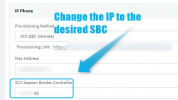
But my problem is that how to make the phones appear so that they give me an option to provision with the second pi that i just re-did to be part of the first main instance that i m keeping now. My first SBC ip is 192.X.X.250 and second one is 192.X.X.251. and again i want to force the rest of the half phones that i just factory reset to be provisioned with second pi , again thanks in advance
First of all thanks for stopping by and giving time to this. i have a customer where they wanted two different companies under the same roof ,so i installed two SBC (raspberry pi4 s ) and setup two different instances (hosted by 3cx) and done. But now customer wants to have just one system under the same roof and my problem is that i have factory reset half of the phones (that was for different instance ((second company ))) and trying to configure with one instance and but is happening is that the phones are showing up fine to be provisioned with the 3cx under the PHONES but they are only picking up SBC # 1's ip So since i had 2 raspberry pis for each instance now i decided to keep one pi for one half phones and the second pi for other half phones .
But my problem is that how to make the phones appear so that they give me an option to provision with the second pi that i just re-did to be part of the first main instance that i m keeping now. My first SBC ip is 192.X.X.250 and second one is 192.X.X.251. and again i want to force the rest of the half phones that i just factory reset to be provisioned with second pi , again thanks in advance