Multitenant Mode and couple outbound rules.

Nik_si

Bronze Partner
Basic Certified
Joined
Jun 7, 2024
Messages
61
Reaction score
4
Hello,

I've read this thread but I have still quesitons (https://www.3cx.com/community/threads/outbound-rule-in-multi-tenancy-not-working.135301/#post-646739)

I have Multitenant mode activated, 16SC pro, version 20.

I registered 2 trunk successfully, but I have issues on outbound.

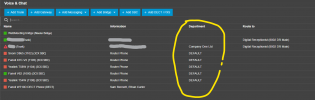
Outbound 1 - Dept 1 (Members 100-109)
Outbound 2 - Dept 2 (110-115)

before adding of Out 2, Out 1 was calling out successfully. after adding out 2 was not calling but 1 yes. now without any change, dept 1 (also other relevant ext's) won't make call but 2 yes.

so I am so confused what goes wrong? btw call is incoming on both dept.
 

Attachments

  • 1760903637567.png
    1760903637567.png
    27.6 KB · Views: 10
  • 1760903687369.png
    1760903687369.png
    40.6 KB · Views: 10
  • 1760903746374.png
    1760903746374.png
    39.8 KB · Views: 10
  • Screenshot 2025-10-19 at 23.59.47.png
    Screenshot 2025-10-19 at 23.59.47.png
    11.6 KB · Views: 10
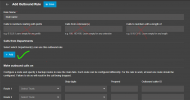
"Allow outbound calls" is marked for both Trunk.


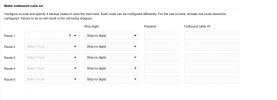
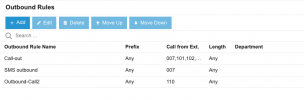
this is also config of Outbound call (this was working before).
1760904479251.png
 
Use the departments filter on the rule and not the "from extensions" field.
 
  • Like
Reactions: KyriacosS_3CX
I changed with the departments but still not succeed, I swap a route also and now result is vice versa, so I think issue comes from Phone number provider. am I right?
 
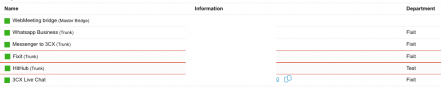
also what does it means?

the 2 red rectangles, around a trunks?
 

Attachments

  • 1760946453394.png
    1760946453394.png
    19.4 KB · Views: 12
any update regarding this?
 
Hi,

We have two questions going I believe, and it's not quite clear what they refer too.

For the red rectangles, are the Trunks via Generic Sip Provider template? It's just highlighting that they are not from a supported provider, so no support can be given if there are issues.

For the Outbound calling, can you repeat the screenshots with the current setup and describe the behaviour now, if it is still a problem.
 
Hello, yes SIP is Generic not supported (Twilio or etc.)

So, I have 2 different Department and 2 outbound rule.

Ext from dept 1 won't call (I have error message "NOT allowed"
Ext from dept 2 can call.


when I am swapping routes in outbound rules. Then dept 1 can call but can't dept 2.


I can't reach to call with both, Multitenant is enabled.
 
Can we see screenshot of outbound rules again please?
 
sorry for delay @KyriacosS_3CX

This is rules, from 007 I can't call with route HitHub, but if I will change with Fixit route, it works from 007 also.

btw incoming calls works, sip is registered.

1761249667196.png
 
I believe @ConceptsWeb already mentioned - do not use Extensions as a filter at all (leave empty), put the Department in only for your rules.

1761289011649.png
 
  • Like
Reactions: Evolute IT
@KyriacosS_3CX now I do this. rule 1 is not works, rule 2 yes, yesterday was vice-versa.


1761295649050.png


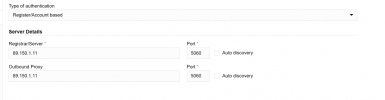
for both trunk registration server and port is same, also each trunk is limited to relevant department, when I am calling from 007 (Fixit) I am reaching "not allowed"

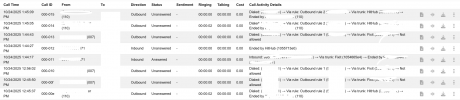
Dialed: (5********71) → Via rule: Outbound rule 1 (5********71) → Via trunk: Fixit (5********71) → Not allowed

1761295744180.png

I talked to SIP provider and told me that nothing restriction is not applied regarding this.
 
What department are your Trunks setup under?

1761296394158.png
 
  • Like
Reactions: Evolute IT
@KyriacosS_3CX

Fixit and test.

btw if I will change on rule 1 from Fixit route to hithub, it works as well..

1761296864199.png
 
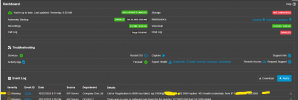
The correct roule is getting picked, the error "Not Allowed" id most probably from the SIP provider side. We can confirm this by checking the event log on the Dashboard.

It is likely that they need to have the number passed to them in some specific way, such as with an international prefix. You would need to talk with them and then modify the outbound rule to comply with what they need.

Here is where you should see a log line with more detail on why the call failed:
1761298598259.png
 
Latest event log I have this ( I tried to change port with 5062 instead 5060 and that why was fail)

btw call is incoming with both trunk

1761299012464.png
 
Please do a normal call like the one that failed before and made that Calls report line. Let's not add other things to the mix.
 
Please do a normal call like the one that failed before and made that Calls report line. Let's not add other things to the mix.
here is result
1761299733907.png
 
And what was visible in the Dashboard log for those calls?
 

Latest Posts

Forum statistics

Threads
112,156
Messages
591,013
Members
165,188
Latest member
Teemal