Music on Hold (MOH)

Status
Not open for further replies.

Dominique_CH

SMB User
Advanced Certified
Joined
Mar 20, 2020
Messages
84
Reaction score
15
I have a problem w/ MOH on my 3CX and it looks like I'm not alone:
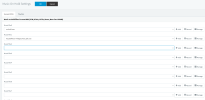
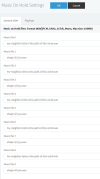
- I checked the Settings > MOH and added "my" favorite music to one of the entries
- I managed to select my music for call Qs and that works
However, no way to change the default music when an agent put a call on hold :(. What am I missing ? Where is the corresponding setting?
 
Hello,

The wav file set under Settings > Music on hold is the file that will be played when a user places a call on hold.
 
However, no way to change the default music when an agent put a call on hold :(. What am I missing ?
Hold or park? Parked is under Settings/Call Parking. Note Conferencing has its own setting also.
 
No it is Hold, not Park. The problem is that Settings > MOH contains a list of wav-files, but I don't get how to select the one to be active as MOH: is it always the first on this list, i.e. music file 0?
 

Attachments

  • MOHsettings.png
    MOHsettings.png
    31.3 KB · Views: 88
I should have been more specific: a 3cx-extension receives a call and puts it on hold to make an attended transfer to another extension. During that time, the calling party hears MOH and I'd like to select the music file to be played.
 
Just select one file in slot 0 and leave the others blank. If you have more slots populated it will rotate, or there is a randomize option at the bottom.

Or, configure a playlist and select the playlist. (useful for switching normal vs holiday music)
 
Thanks @SteveITS, that's perfect.
I didn't realize the rotation would be the default having more that 1 music file listed!
 
That is a very old bug that has not been fixed going back at least to version 16.

It picks EVERY choice randomly even the empty ones. If you did not pick a music file for the other remaining 8 slots, it will default to the first one. So it plays option 1 only 10% of the time. Option 0 plays 90% of the time because it picked options 2-9 80% of the time and plays the default option 0 because they were blank when that happens.

You must fill out EVERY line of this list, even if you pick the same music file for half of the entries, and half of the second music file to get a good 50/50 randomized sample.


Here is how I setup 2 songs to play randomly, I alternate the options between the two using every available music file slot:

2022-11-02 22_17_29-3CX Phone System Management Console.png
 
  • Wow
Reactions: SteveITS
How to do it on 3cx Cloud SMB plz and thank you
 
Status
Not open for further replies.

Forum statistics

Threads
111,974
Messages
590,081
Members
164,899
Latest member
mazet